Come utilizzare AMusicSoft Pandora Music Converter
Parte 1. Come registrare AMusicSoft Pandora Music Converter
Passaggio 1. Scarica e installa AMusicSoft Pandora Music Converter
Puoi scaricare il pacchetto di installazione dalla pagina del prodotto o semplicemente cliccando sul pulsante di download qui. AMusicSoft Pandora Music Converter è attualmente supportato su dispositivi Mac e Windows.
Passaggio 2. Attivare AMusicSoft Pandora Music Converter
Per gli utenti della versione di prova gratuita: se stai utilizzando la versione di prova gratuita, puoi avviare direttamente il programma ed esplorare le sue funzionalità. Con la versione di prova gratuita, puoi convertire solo 3 brani completi da Pandora Music. Per convertire più brani senza limitazioni, dovrai registrarti e attivare la versione completa del software. (Per acquistare la licenza di AMusicSoft, puoi visitare l' AMusicSoft Online Store . Gli utenti della versione di prova gratuita possono anche contattare il nostro team di assistenza clienti per conoscere le ultime promozioni e offerte speciali.)
Per gli utenti a pagamento: clicca sull'icona del profilo nell'angolo in basso a sinistra. Quindi seleziona "Accedi con licenza". Inserisci l'indirizzo email utilizzato per l'acquisto del software e il codice di registrazione/chiave di licenza. Clicca su "Accedi" per completare l'attivazione.
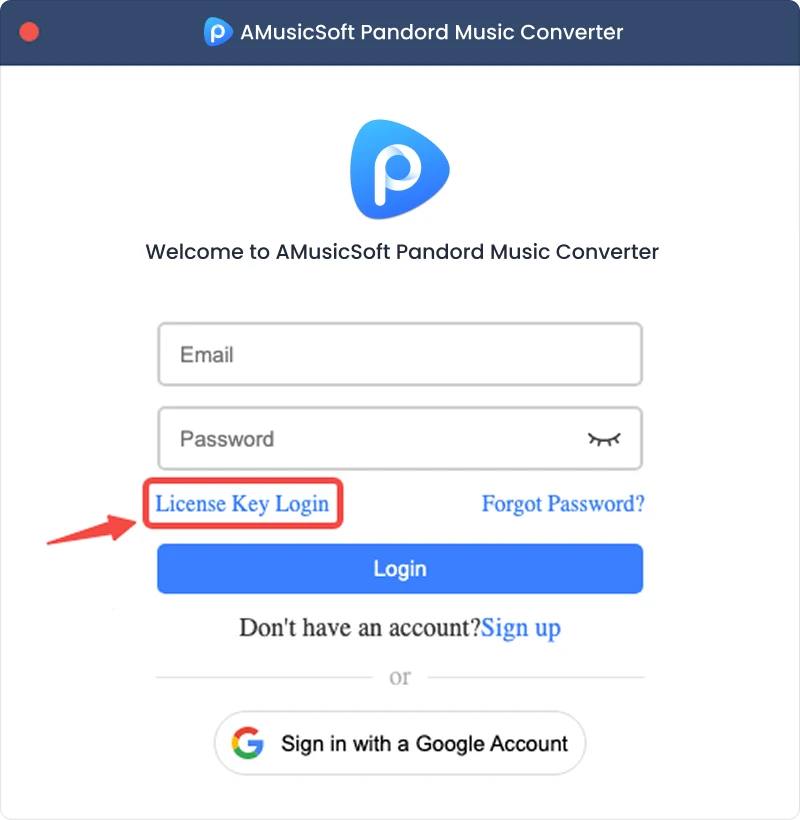
Nota: assicurati di inserire lo stesso indirizzo email associato al tuo acquisto e di utilizzare il codice di registrazione corretto. Potrebbe essere necessaria una connessione Internet attiva per la verifica.
Parte 2. Come convertire la musica di Pandora nel formato desiderato
Passaggio 1. Seleziona Pandora Music
Avvia AMusicSoft Pandora Music Converter. Nell'interfaccia principale, seleziona Pandora Music.
Passaggio 2. Accedi a Pandora Music
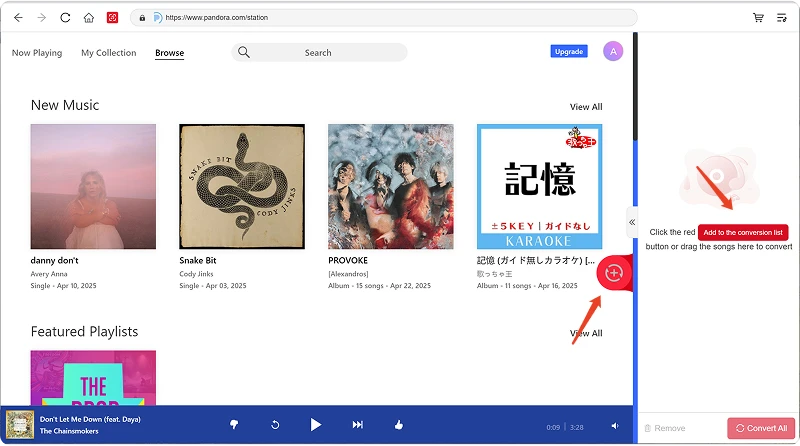
AMusicSoft Pandora Music Converter integra i lettori web ufficiali delle piattaforme musicali supportate. Dopo aver selezionato Pandora Music, accedi con il tuo account Pandora Music per cercare e scaricare musica.
Passaggio 3. Aggiungi musica al programma
Dopo aver effettuato l'accesso, sfoglia la tua libreria musicale e seleziona i brani, le playlist, gli album o i podcast che desideri convertire. Fai clic su "Aggiungi alla conversione" accanto a un brano o a una playlist per aggiungerlo all'elenco di conversione, oppure trascina e rilascia la musica sull'icona "+" fluttuante.
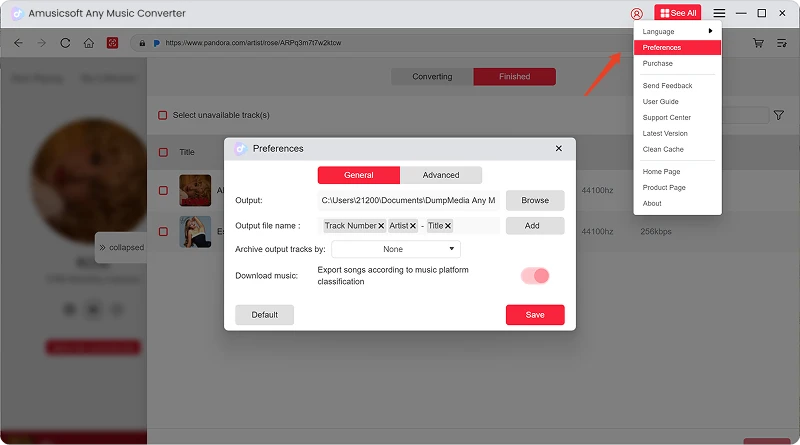
Disponibilità dei contenuti: la disponibilità di qualsiasi brano o album dipende interamente dallo stato dell'abbonamento e dalle autorizzazioni regionali dell'account che utilizzi.
Passaggio 4. Selezionare il formato di output e personalizzare le impostazioni di output.
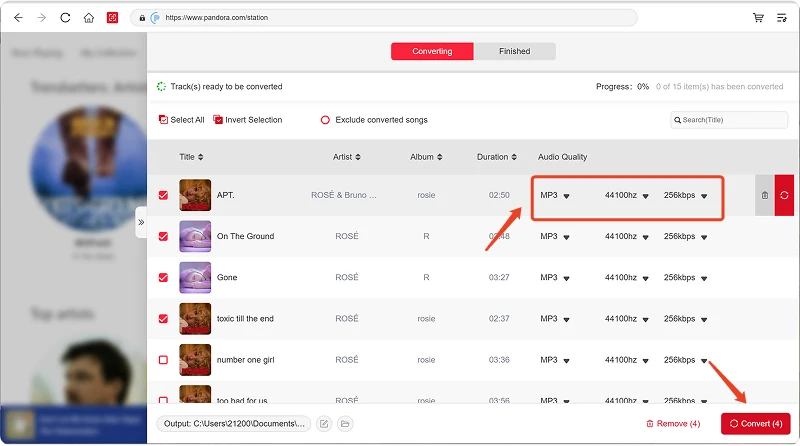
Dopo aver aggiunto la tua musica, apri il menu Formato di output per scegliere il formato che preferisci. AMusicSoft Pandora Music Converter ti permette anche di regolare i parametri di output disponibili in base alle tue esigenze, come bitrate, frequenza di campionamento e altri. Infine, fai clic sull'opzione Percorso di output o sulla cartella di selezione e scegli dove desideri salvare i file. Se non hai familiarità con queste impostazioni, puoi mantenere la configurazione predefinita per un processo di conversione più semplice.
Passaggio 5. Inizia la conversione della musica
Una volta configurate tutte le impostazioni, rivedi l'elenco delle conversioni e fai clic sul pulsante Converti. Il software inizierà a elaborare i file musicali selezionati. Le informazioni sullo stato di avanzamento ti consentono di monitorare l'andamento della conversione. Per le conversioni in batch, puoi aggiungere più brani ed elaborarli insieme anziché convertire ogni file singolarmente.
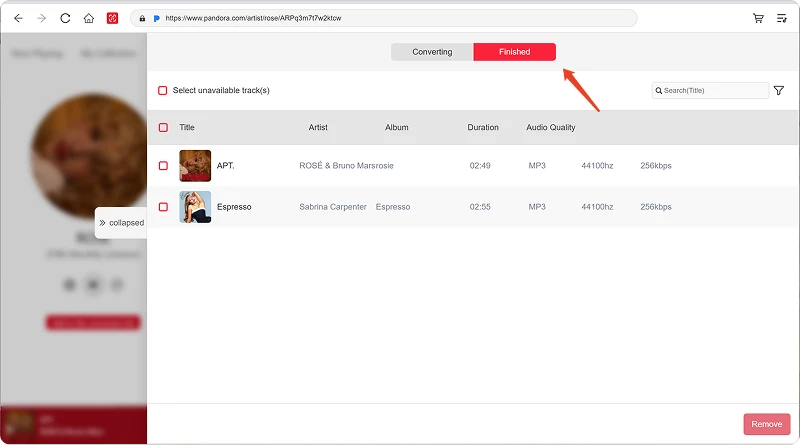
Passaggio 6. Trova la musica convertita
Al termine della conversione, apri la cartella di output selezionata per accedere ai file convertiti. Potrai quindi trasferirli su dispositivi compatibili, organizzarli nella tua libreria musicale locale o riprodurli con lettori multimediali supportati.
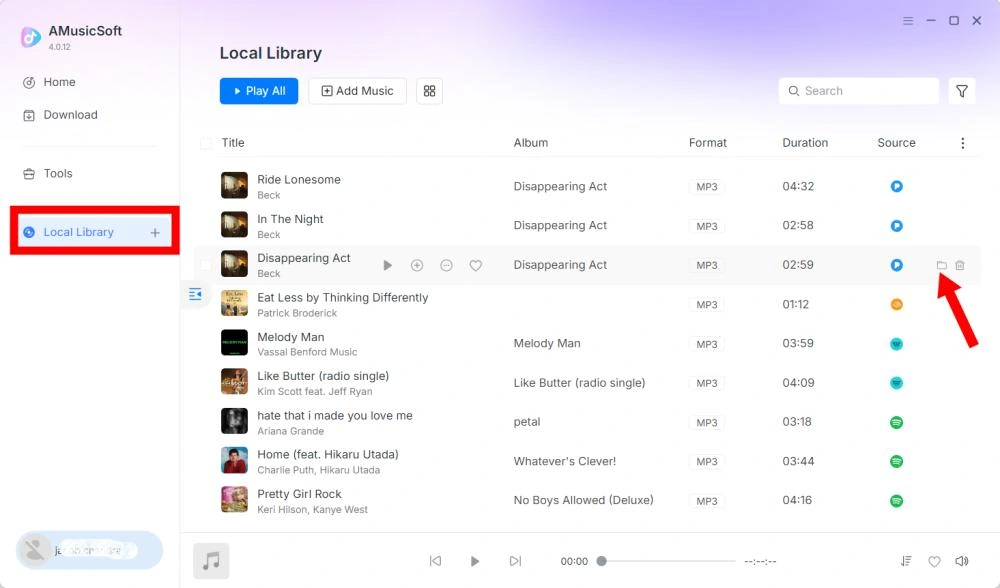
Parte 3. Cosa devo fare se non riesco a scaricare la musica?
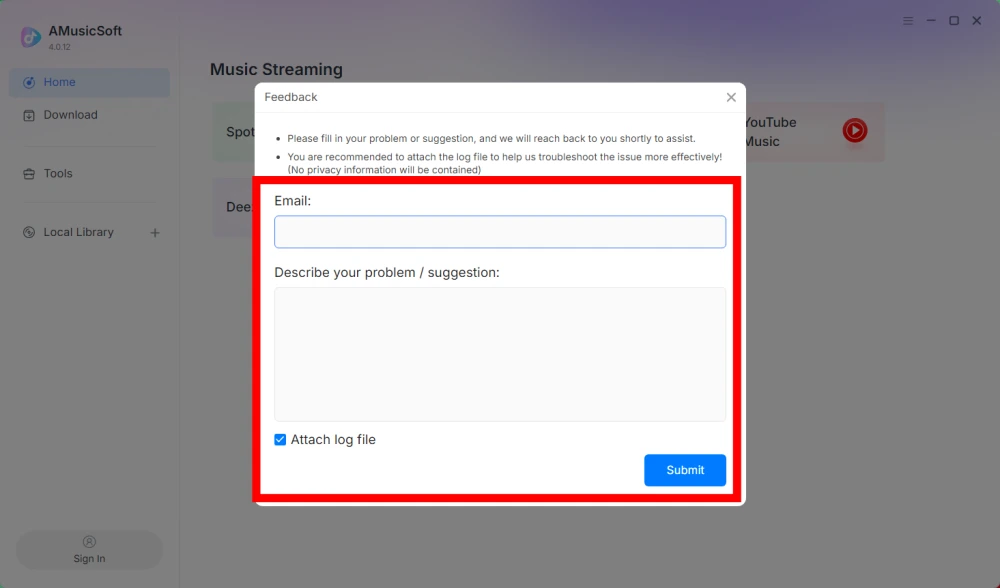
Se riscontri un problema durante il download o la conversione di musica, ti preghiamo di inviare il registro del software e uno screenshot dell'errore al nostro team di supporto. Queste informazioni ci aiuteranno a identificare il problema e a fornirti una soluzione più rapidamente.
- Fai clic sul menu in alto a destra del programma e seleziona "Invia feedback".
- Descrivi il problema e inserisci il tuo codice di licenza nella casella di testo.
- Infine, prima di inviare, spuntate la casella "Allega il file di registro".
Parte 4. Come preimpostare le impostazioni di output e i parametri audio
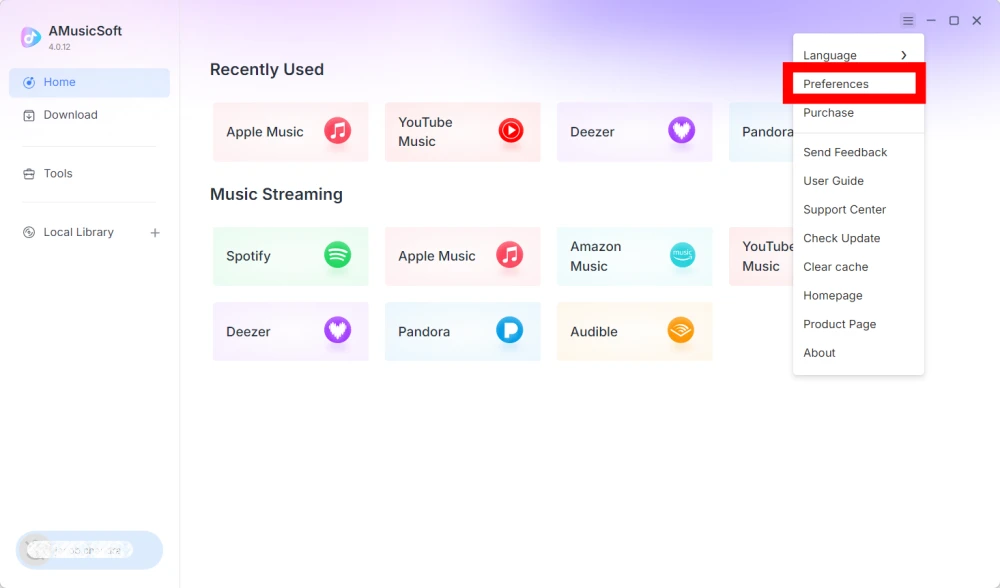
AMusicSoft Any Music Converter consente di personalizzare le impostazioni di download e i parametri audio per controllare il processo di conversione e la qualità dell'output. È possibile regolare queste impostazioni direttamente dall'elenco di conversione prima di avviare la conversione, oppure accedere a Menu > Preferenze per preimpostare i parametri preferiti in anticipo.
Lingue disponibili
Seleziona la lingua che preferisci per l'interfaccia del software.
Impostazioni generali
- Aspetto - Personalizza l'aspetto dell'interfaccia del software.
- Cartella di output - Selezionare la cartella in cui salvare i file convertiti.
- Modello di denominazione automatica - Personalizza il formato di denominazione dei file.
- Archivia per - Scegli come organizzare la musica scaricata.
- Dopo la conversione - Scegli cosa succede dopo che la conversione è stata completata.
- Salva musica - Abilita o disabilita il salvataggio dei file musicali convertiti.
- Testo della canzone - Abilita o disabilita il salvataggio del testo della canzone insieme alla musica.
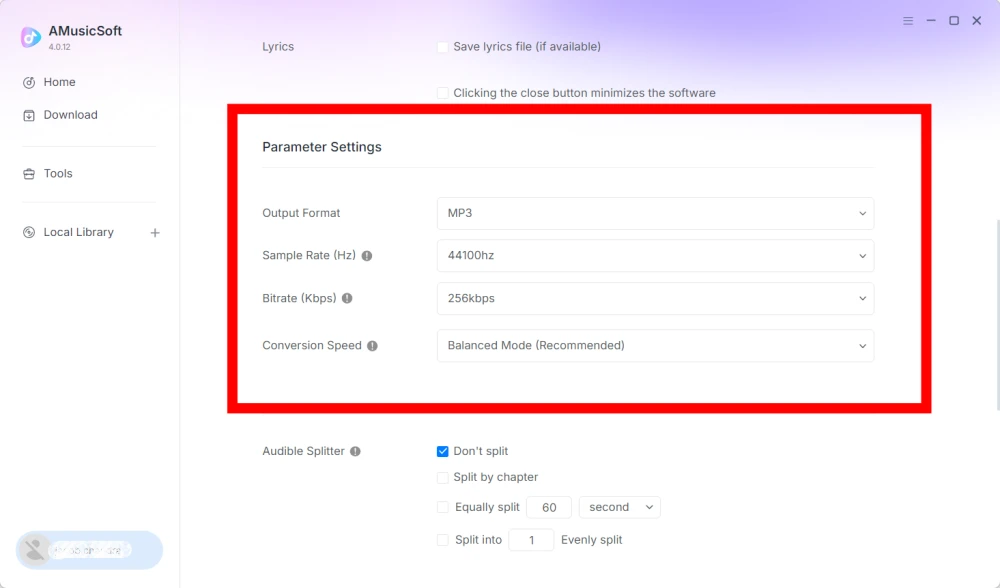
Impostazioni parametri
- Formato di output - Selezionare il formato di output audio desiderato.
- Frequenza di campionamento (Hz) - Imposta la frequenza di campionamento audio. (Intervallo da 22050 Hz a 48000 Hz.)
- Bitrate (Kbps) - Imposta il bitrate audio per controllare la qualità dell'output. (Intervallo da 128 Kbps a 320 Kbps.)
- Velocità di conversione - Regola la velocità di conversione in base alle tue esigenze.
- Audible Splitter - Divide gli audiolibri Audible in sezioni più piccole.
Impostazioni di riproduzione
Dissolvenza incrociata tra brani: consente una transizione fluida tra i brani durante la riproduzione.
Impostazioni di rete
- Download simultanei - Imposta il numero di file musicali da scaricare contemporaneamente.
- Proxy - Configura le impostazioni proxy per le connessioni di rete.
altre impostazioni
Pop-up - Abilita o disabilita le notifiche pop-up.
Parte 5. Come gestire il tuo account AMusicSoft
Puoi gestire il tuo account AMusicSoft e le informazioni relative all'abbonamento dal centro account.
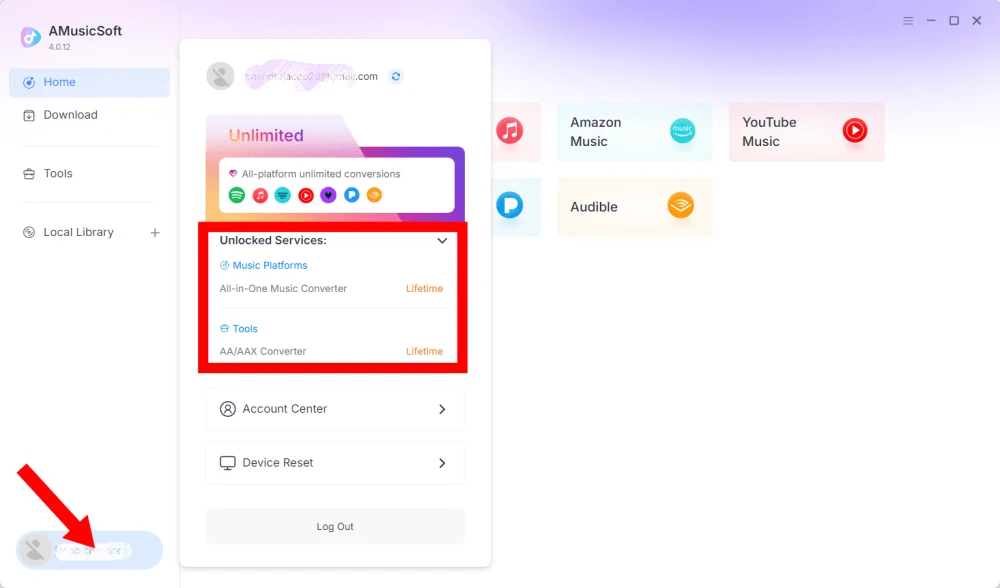
Visualizza i servizi sbloccati
Fai clic sull'icona del profilo nell'angolo in basso a sinistra. Potrai quindi verificare i servizi e le funzionalità attualmente sbloccati per il tuo account.
Accedi al Centro account
Fai clic sull'icona del profilo > "Centro account" per accedere al Centro account di AMusicSoft, dove puoi gestire il tuo account e le relative informazioni.
- Informazioni personali - Aggiorna il tuo nome utente e fai clic su "modifica" per cambiare la foto del tuo avatar. (Usa il pulsante "Elimina account" nell'angolo in basso a destra con cautela. Una volta eliminato l'account, quest'ultimo e la relativa chiave di licenza verranno immediatamente disattivati. Assicurati di non avere un abbonamento attivo prima di procedere.)
- Abbonamento - Visualizza e gestisci i tuoi abbonamenti attuali. Se desideri annullare un abbonamento, fai clic su "Gestisci abbonamento" per metterlo in pausa. Se non riesci ad annullarlo, contatta il servizio clienti.[email protected]).
- Gestione dispositivi - Se stai passando a un altro dispositivo e desideri utilizzare AMusicSoft sul nuovo dispositivo, puoi completare facilmente l'operazione. Se non riesci a ripristinare le impostazioni, contatta l'assistenza clienti.
- Fatturazione - Tutti i dettagli dell'ordine sono disponibili qui. Se non riesci a visualizzare la fattura, contatta il servizio clienti.
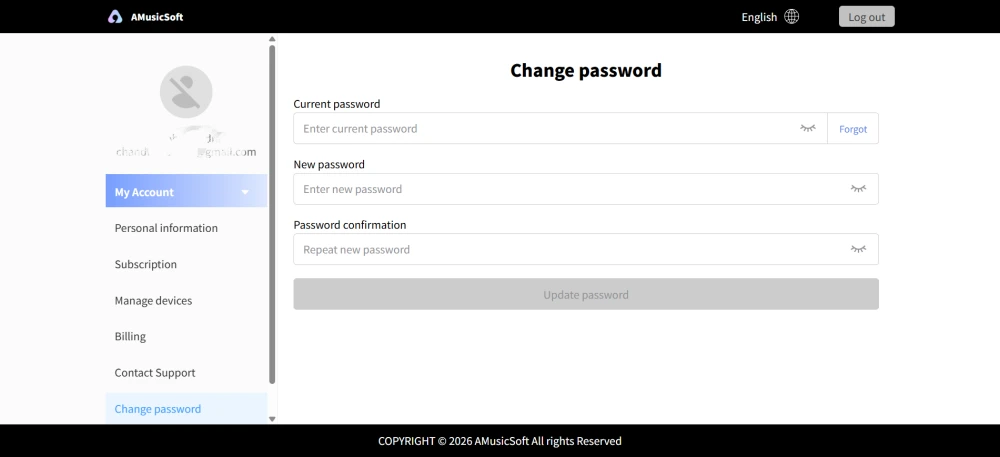
- Cambia password - Imposta la nuova password che preferisci. Se hai dimenticato la password attuale, fai clic su "Dimenticata". Segui le istruzioni sullo schermo per reimpostare la password.
Parte 6. FAQ
-
Gli abbonamenti di AMusicSoft non includono alcun abbonamento a servizi di streaming. Per accedere e convertire i brani musicali, gli utenti devono prima disporre di un proprio account su un servizio di streaming. La disponibilità di qualsiasi brano, playlist o album dipende interamente dallo stato dell'abbonamento e dalle autorizzazioni regionali dell'account di streaming utilizzato.
Servizi di streaming in abbonamento (ad esempio, Apple Music): è necessario disporre di un abbonamento attivo collegato al proprio account per accedere e riprodurre contenuti dalle piattaforme di streaming premium.
Servizi gratuiti: per i servizi di streaming che offrono accesso gratuito (ad esempio, Spotify), è possibile utilizzare un account gratuito per accedere e convertire i brani musicali disponibili. -
Sì. È possibile preimpostare il formato di output, la frequenza di campionamento, il bitrate e altri parametri audio in Menu > Preferenze.
-
Per impostazione predefinita, i file convertiti vengono salvati nella cartella di output designata. È possibile modificare la posizione in Impostazioni generali > Cartella di output.
-
Sì. Vai su Impostazioni di rete > Download simultanei per regolare il numero di download simultanei.