如何使用AMusicSoft Pandora音樂轉換器
部分1。 如何註冊 AMusicSoft Pandora 音樂轉換器
步驟 1. 下載並安裝 AMusicSoft Pandora 音樂轉換器
您可以從產品頁面下載安裝包,或直接點擊此處提供的下載按鈕。 AMusicSoft Pandora音樂轉換器目前支援Mac和Windows裝置。
步驟 2. 啟動 AMusicSoft Pandora 音樂轉換器
免費試用用戶須知:如果您正在使用免費試用版,可以直接啟動程式並探索其所有功能。免費試用版僅允許您轉換 3 首來自 Pandora Music 的完整歌曲。如需轉換更多曲目且無任何限制,您需要註冊並啟動完整版軟體。 (如需購買 AMusicSoft 許可證,您可以造訪AMusicSoft 線上商店。免費試用用戶也可以聯絡我們的客戶支援團隊,以了解最新的促銷活動和特價資訊。)
付費用戶:點擊左下角的個人資料圖標,然後選擇「使用許可證登入」。輸入您購買軟體時使用的郵件地址和註冊碼/許可證金鑰。點選「登入」完成啟動。
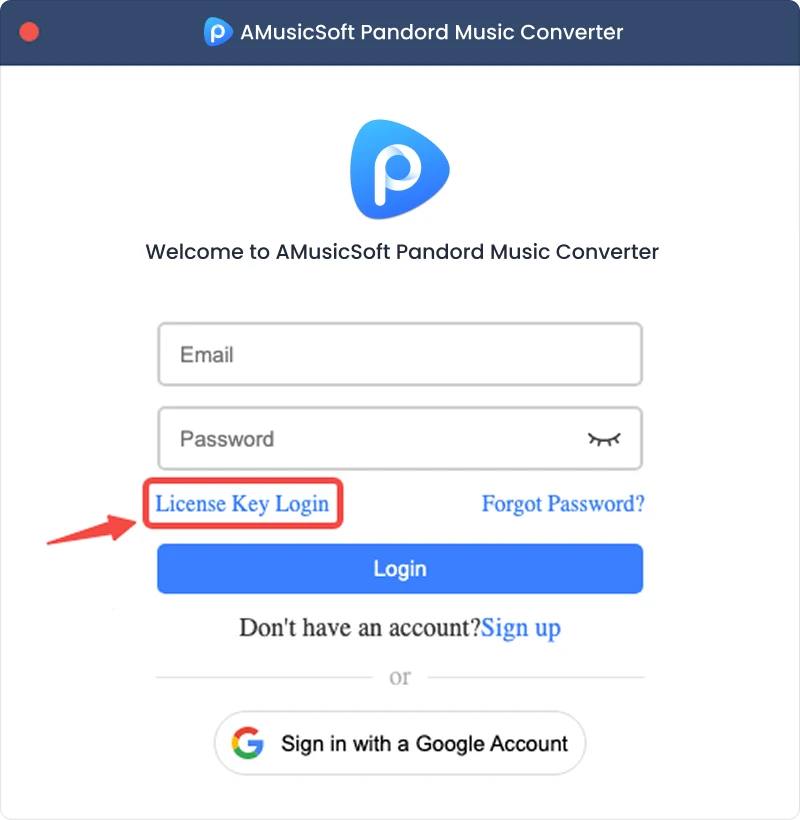
注意:請確保輸入與購買時關聯的電子郵件地址,並使用正確的註冊碼。驗證過程可能需要連接網路。
部分2。 如何將 Pandora 音樂轉換為您喜歡的格式
第一步:選擇 Pandora 音樂
啟動AMusicSoft Pandora音樂轉換器。在主介面上,選擇Pandora音樂。
步驟 2. 登入 Pandora Music
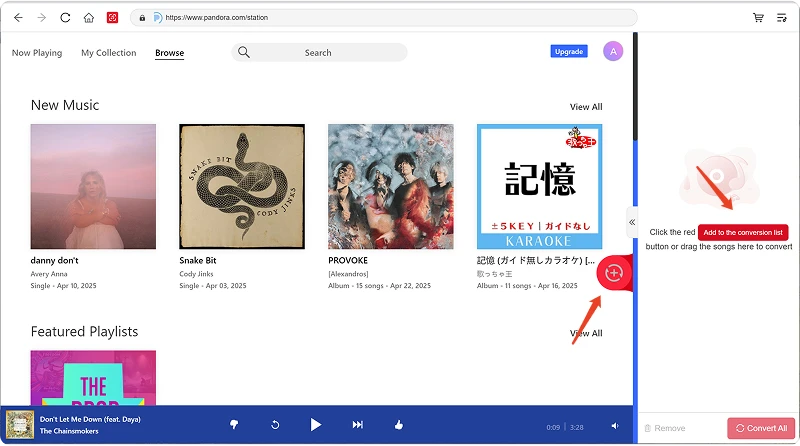
AMusicSoft Pandora音樂轉換器整合了所支援音樂平台的官方網頁播放器。選擇Pandora音樂後,使用您的Pandora音樂帳戶登入即可搜尋和下載音樂。
步驟3.將音樂添加到程序
登入後,瀏覽您的音樂庫,選擇您想要的歌曲、播放清單、專輯或Podcast。點擊歌曲或播放清單旁邊的「新增到轉換」按鈕,將其新增至轉換清單;或將音樂拖曳到懸浮的「+」圖示上。
內容可用性:任何歌曲或專輯的可用性完全取決於您使用的帳戶的訂閱狀態和地區權限。
步驟 4. 選擇輸出格式並自訂輸出設定
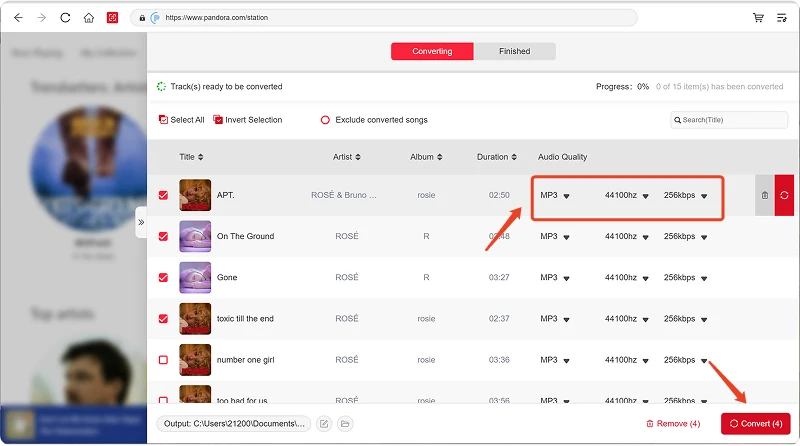
新增音樂後,開啟“輸出格式”選單選擇您所需的格式。 AMusicSoft Pandora 音樂轉換器還可讓您根據需要調整可用的輸出參數,例如位元率、取樣率等。最後,點選輸出路徑或資料夾選擇選項,選擇檔案的儲存位置。如果您不熟悉這些設置,可以保留預設配置以簡化轉換過程。
第四步:開始轉換音樂
所有設定配置完成後,請查看轉換清單並點選「轉換」按鈕。軟體將開始處理所選的音樂檔案。您可以透過進度資訊監控轉換狀態。對於批次轉換,您可以添加多首歌曲並一起處理,而無需單獨轉換每個檔案。
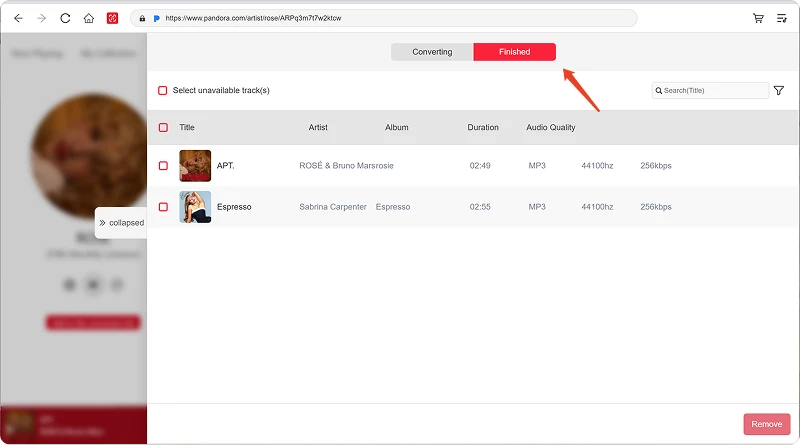
步驟 6:尋找轉換後的音樂
轉換完成後,開啟選定的輸出資料夾即可存取轉換後的檔案。然後,您可以將檔案傳輸到相容裝置、整理到本機音樂庫或使用支援的媒體播放器播放。
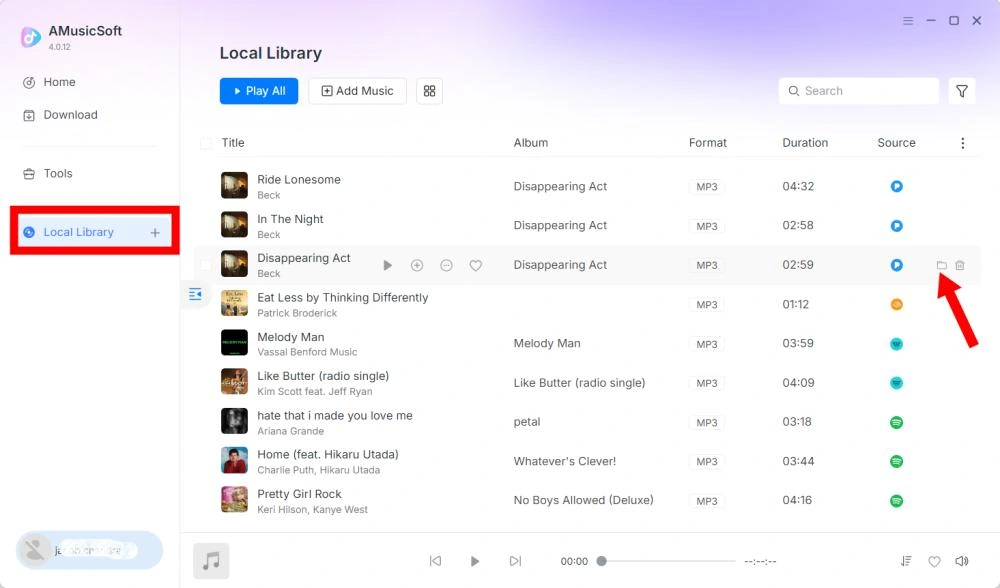
部分3。 如果我無法下載音樂該怎麼辦?
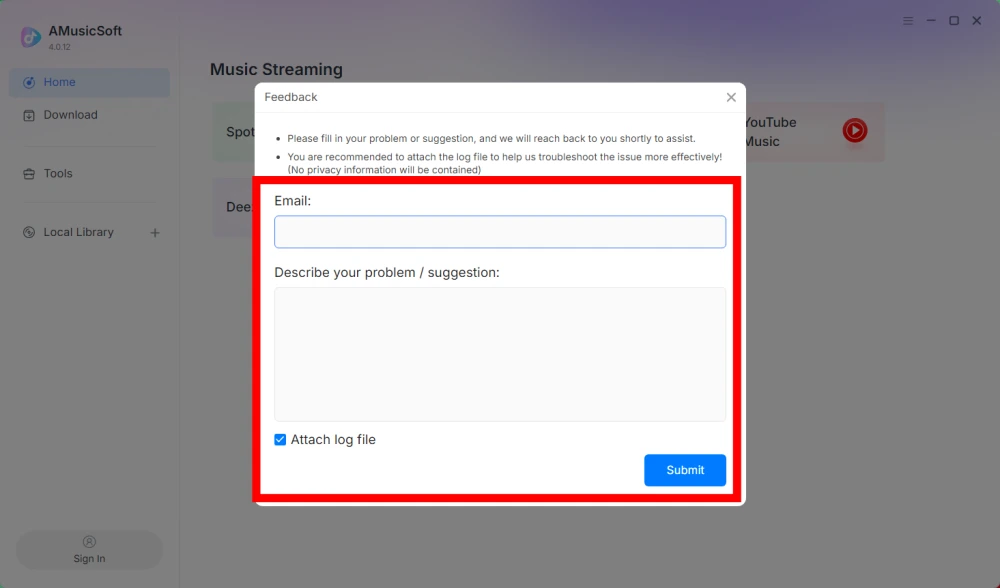
如果您在下載或轉換音樂時遇到問題,請將軟體日誌和錯誤截圖提交給我們的支援團隊。這些資訊將有助於我們更快地識別問題並提供解決方案。
- 點擊程式右上角的選單,然後選擇「傳送回饋」。
- 請在文字方塊中描述您的問題並寫下您的許可證密鑰。
- 最後,請在提交前勾選「附加日誌檔案」複選框。
部分4。 如何預設輸出設定和音訊參數
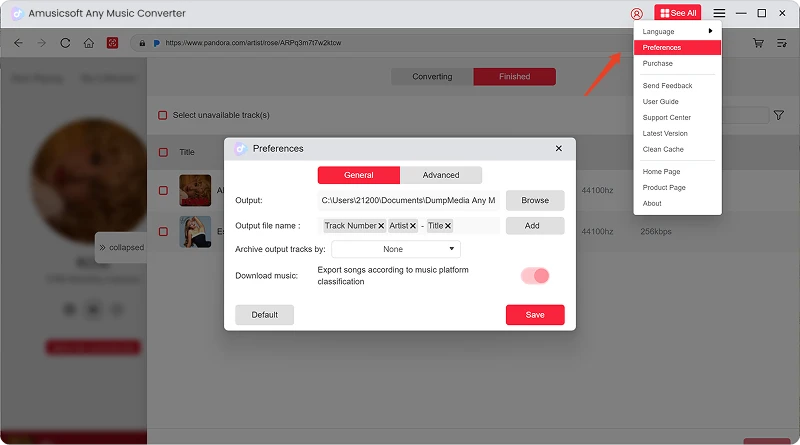
AMusicSoft Any Music Converter 可讓您自訂下載設定和音訊參數,從而控制轉換過程和輸出品質。您可以在開始轉換前直接從轉換清單中調整這些設置,也可以前往「選單」>「首選項」預先預設您所需的參數。
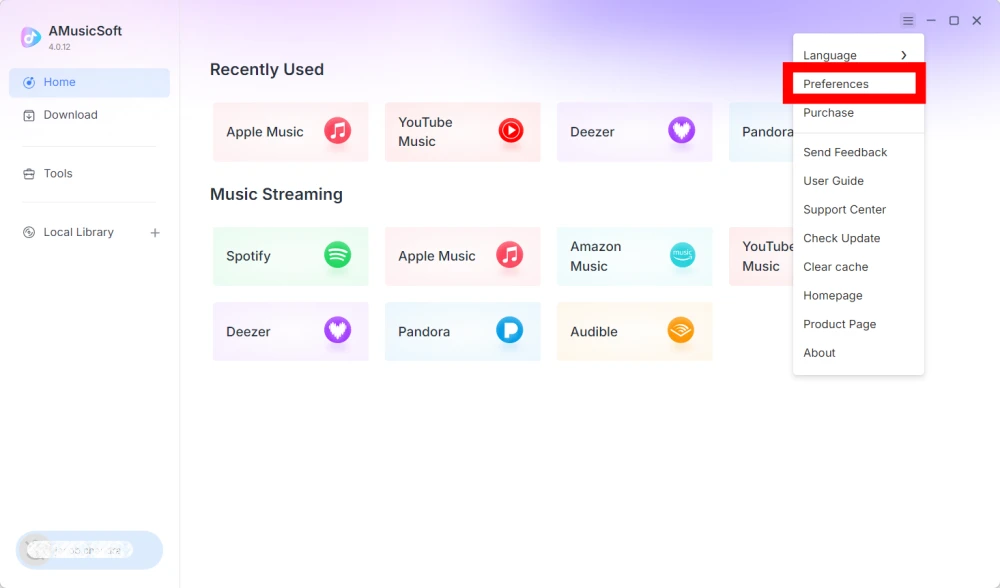
語言
請選擇您偏好的軟體介面語言。
常規設置
- 外觀 - 自訂軟體介面外觀。
- 輸出資料夾 - 選擇儲存轉換後檔案的資料夾。
- 自動命名模式 - 自訂檔案命名格式。
- 依歸檔方式 - 選擇如何整理下載的音樂。
- 轉換後 - 選擇轉換完成後要執行的操作。
- 儲存音樂 - 啟用或停用儲存轉換後的音樂檔案。
- 歌詞 - 啟用或停用將歌詞與音樂一起儲存。
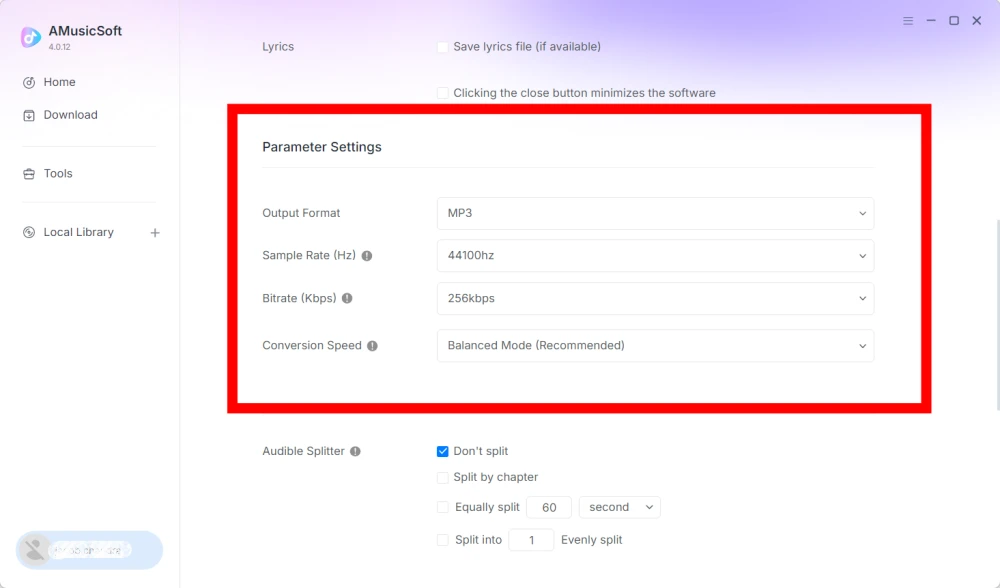
參數設定
- 輸出格式 - 選擇所需的音訊輸出格式。
- 採樣率(Hz)- 設定音頻採樣率。 (範圍從 22050Hz 到 48000Hz。)
- 位元率(Kbps) - 設定音訊位元率以控制輸出品質。 (範圍從 128Kbps 到 320Kbps。)
- 轉換速度 - 根據您的需求調整轉換速度。
- Audible Splitter - 將 Audible 有聲書分割成更小的部分。
播放設置
歌曲淡入淡出 - 實現播放過程中歌曲之間的平滑過渡。
網絡設置
- 同時下載 - 設定要同時下載的音樂檔案數量。
- 代理 - 設定網路連線的代理設定。
其他設置
彈出視窗 - 啟用或停用彈出式通知。
部分5。 如何管理您的 AMusicSoft 帳戶
您可以透過帳戶中心管理您的 AMusicSoft 帳戶和訂閱資訊。
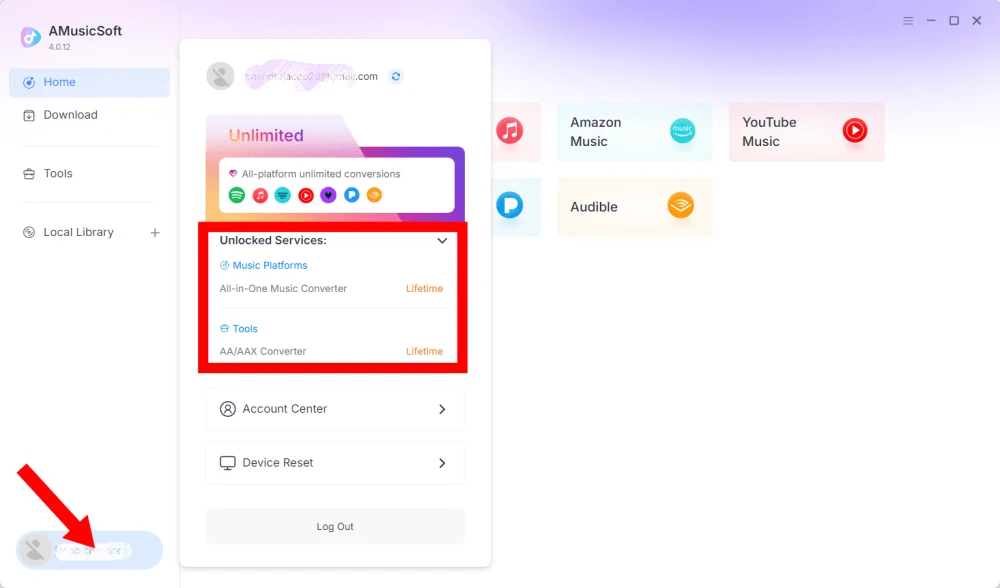
查看已解鎖服務
點擊左下角的個人資料圖示。然後您可以查看您的帳戶目前已解鎖的服務和功能。
造訪帳戶中心
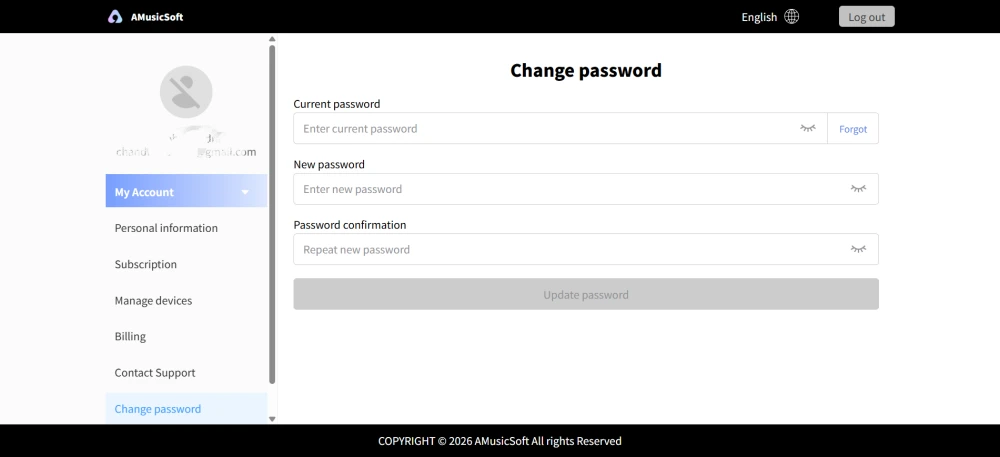
點擊個人資料圖示 > “帳戶中心”進入 AMusicSoft 帳戶中心,您可以在這裡管理您的帳戶和相關資訊。
- 個人資訊 - 更新您的用戶名,然後點擊「編輯」按鈕更改您的頭像照片。 (請謹慎使用右下角的「刪除帳戶」按鈕。帳戶刪除後,帳戶及其關聯的許可證金鑰將立即停用。請確保您沒有有效的訂閱後再進行操作。)
- 訂閱 - 查看和管理您目前的訂閱。如果您想取消訂閱,只需點擊「管理訂閱」暫停即可。如果您無法取消,請聯絡客服([email protected]).
- 管理設備 - 如果您要切換到另一個設備並希望在新設備上使用 AMusicSoft,您可以輕鬆完成此操作。如果您無法重置,請聯絡客戶服務。
- 帳單 - 您可以在這裡查看所有訂單詳情。如果您無法查看帳單,請聯絡客服。
- 更改密碼 - 設定您喜歡的新密碼。如果您忘記了目前密碼,請點選「忘記密碼」。請依照螢幕上的指示重設密碼。
部分6。 常見問題
-
AMusicSoft 的訂閱服務不包含任何串流媒體服務訂閱。用戶必須先擁有自己的串流服務帳號才能存取和轉換音樂曲目。任何歌曲、播放清單或專輯的可用性完全取決於您所使用的串流媒體帳號的訂閱狀態和地區權限。
訂閱式串流服務(例如 Apple Music):您必須擁有與您的帳戶關聯的有效訂閱才能存取和轉換來自高級串流平台的內容。
免費服務:對於提供免費存取的串流服務(例如 Spotify),您可以使用免費帳戶存取和轉換可用的音樂曲目。 -
是的。您可以在「選單」>「首選項」下預設輸出格式、取樣率、位元率和其他音訊參數。
-
預設情況下,轉換後的檔案會儲存在指定的輸出資料夾中。您可以在「一般設定」>「輸出資料夾」中變更儲存位置。
-
是的。請前往「網路設定」>「同時下載」調整同時下載的數量。