كيفية استخدام برنامج AMusicSoft Pandora Music Converter
الجزء 1. كيفية تسجيل برنامج AMusicSoft Pandora Music Converter
الخطوة 1: قم بتنزيل وتثبيت برنامج AMusicSoft Pandora Music Converter
يمكنك تنزيل حزمة التثبيت من صفحة المنتج أو ببساطة بالنقر على زر التنزيل الموجود هنا. برنامج AMusicSoft Pandora Music Converter متوافق حاليًا مع أجهزة Mac وWindows.
الخطوة الثانية: تفعيل برنامج AMusicSoft Pandora Music Converter
لمستخدمي النسخة التجريبية المجانية: إذا كنت تستخدم النسخة التجريبية المجانية، يمكنك تشغيل البرنامج مباشرةً واستكشاف ميزاته المتاحة. مع النسخة التجريبية المجانية، يمكنك تحويل 3 أغاني كاملة فقط من Pandora Music. لتحويل المزيد من الأغاني دون أي قيود، ستحتاج إلى التسجيل وتفعيل النسخة الكاملة من البرنامج. (لشراء ترخيص AMusicSoft، يمكنك زيارة متجر AMusicSoft الإلكتروني . كما يمكن لمستخدمي النسخة التجريبية المجانية التواصل مع فريق دعم العملاء لدينا للاطلاع على أحدث العروض الترويجية والعروض الخاصة.)
للمستخدمين المشتركين: انقر على أيقونة الملف الشخصي في الزاوية السفلية اليسرى. ثم اختر "تسجيل الدخول باستخدام الترخيص". أدخل عنوان البريد الإلكتروني المستخدم لشراء البرنامج ورمز التسجيل/مفتاح الترخيص. انقر على "تسجيل الدخول" لإتمام التفعيل.
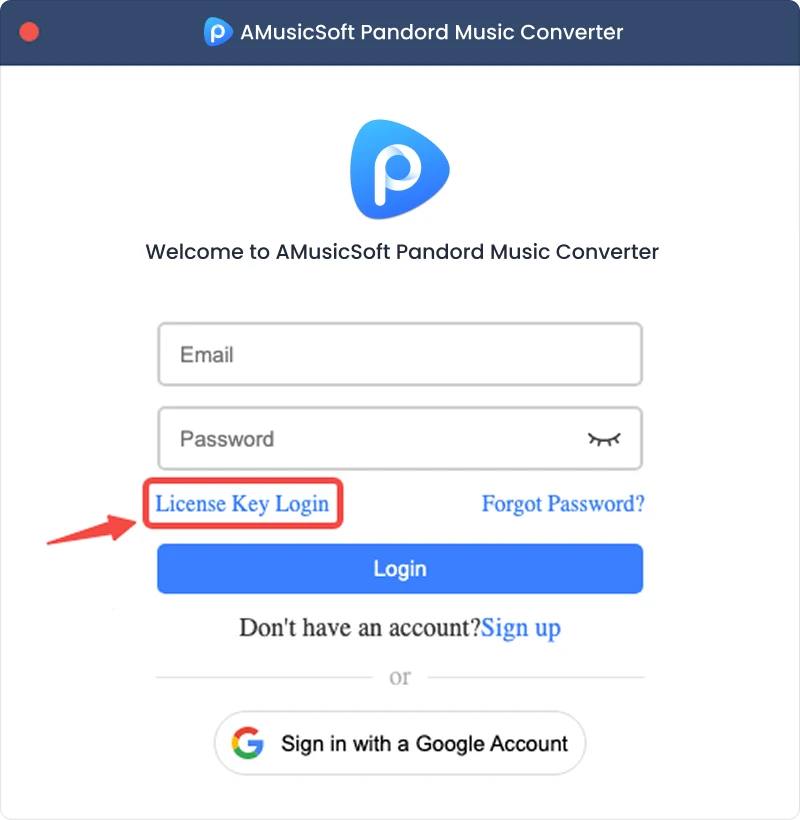
ملاحظة: تأكد من إدخال نفس عنوان البريد الإلكتروني المرتبط بعملية الشراء واستخدام رمز التسجيل الصحيح. قد يلزم وجود اتصال إنترنت نشط للتحقق.
الجزء 2. كيفية تحويل موسيقى باندورا إلى التنسيق الذي تفضله
الخطوة 1. اختر موسيقى باندورا
قم بتشغيل برنامج AMusicSoft Pandora Music Converter. في الواجهة الرئيسية، حدد Pandora Music.
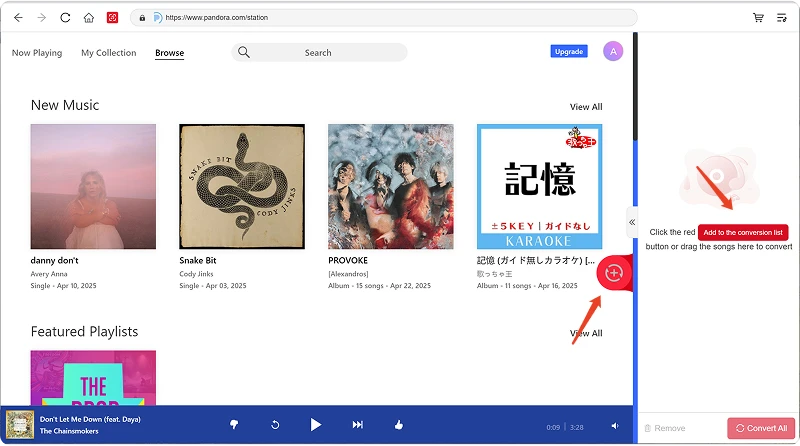
الخطوة الثانية: تسجيل الدخول إلى باندورا ميوزك
يُدمج برنامج AMusicSoft Pandora Music Converter مشغلات الويب الرسمية لمنصات الموسيقى المدعومة. بعد اختيار Pandora Music، سجّل الدخول باستخدام حسابك على Pandora Music للبحث عن الموسيقى وتنزيلها.
الخطوة الثانية: إضافة الموسيقى إلى البرنامج
بعد تسجيل الدخول، تصفح مكتبة الموسيقى الخاصة بك واختر الأغاني أو قوائم التشغيل أو الألبومات أو ملفات البودكاست التي تريدها. انقر على "إضافة إلى التحويل" بجوار المقطع أو قائمة التشغيل لإضافته إلى قائمة التحويل، أو اسحب الموسيقى وأفلتها على أيقونة "+" العائمة.
توافر المحتوى: يعتمد توافر أي أغنية أو ألبوم بشكل كامل على حالة الاشتراك والأذونات الإقليمية للحساب الذي تستخدمه.
الخطوة 4. حدد تنسيق الإخراج وقم بتخصيص إعدادات الإخراج
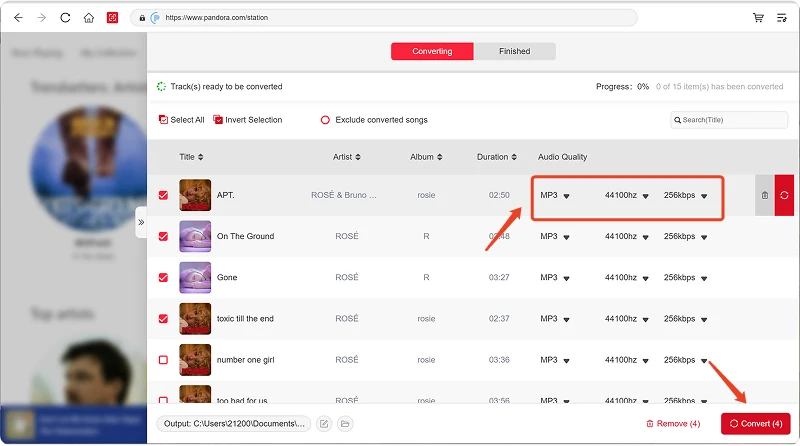
بعد إضافة موسيقاك، افتح قائمة "تنسيق الإخراج" لاختيار التنسيق الذي تفضله. يتيح لك برنامج AMusicSoft Pandora Music Converter أيضًا ضبط معلمات الإخراج المتاحة وفقًا لاحتياجاتك، مثل معدل البت ومعدل العينة وغيرها. أخيرًا، انقر على خيار تحديد مسار الإخراج أو المجلد، واختر المكان الذي تريد حفظ الملفات فيه. إذا لم تكن معتادًا على هذه الإعدادات، يمكنك الاحتفاظ بالإعدادات الافتراضية لتسهيل عملية التحويل.
الخطوة الرابعة: ابدأ بتحويل الموسيقى
بعد ضبط جميع الإعدادات، راجع قائمة التحويل وانقر على زر "تحويل". سيبدأ البرنامج بمعالجة ملفات الموسيقى المحددة. تتيح لك معلومات التقدم مراقبة حالة التحويل. للتحويلات المجمعة، يمكنك إضافة عدة أغاني ومعالجتها معًا بدلًا من تحويل كل ملف على حدة.
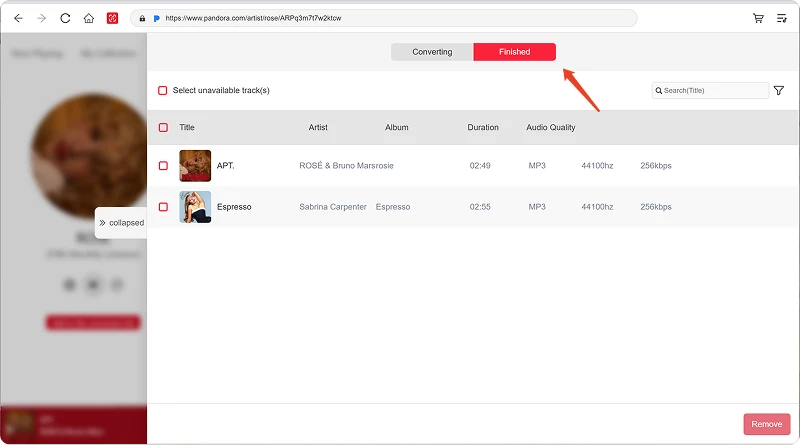
الخطوة 6. العثور على الموسيقى المحولة
بعد اكتمال التحويل، افتح مجلد الإخراج المحدد للوصول إلى ملفاتك المحولة. يمكنك بعد ذلك نقل الملفات إلى الأجهزة المتوافقة، أو تنظيمها في مكتبة الموسيقى المحلية، أو تشغيلها باستخدام مشغلات الوسائط المدعومة.
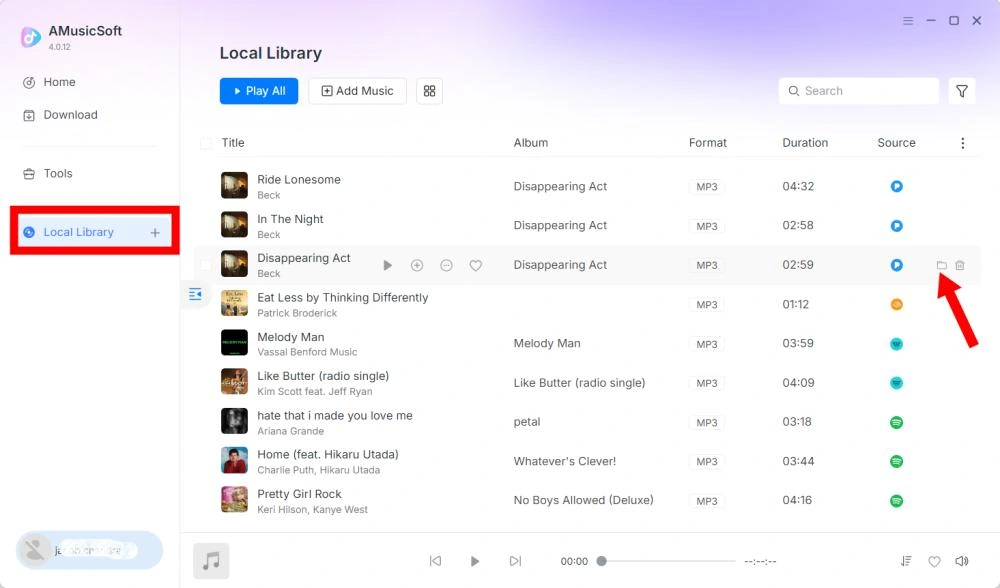
الجزء 3. ماذا أفعل إذا لم أتمكن من تحميل الموسيقى؟
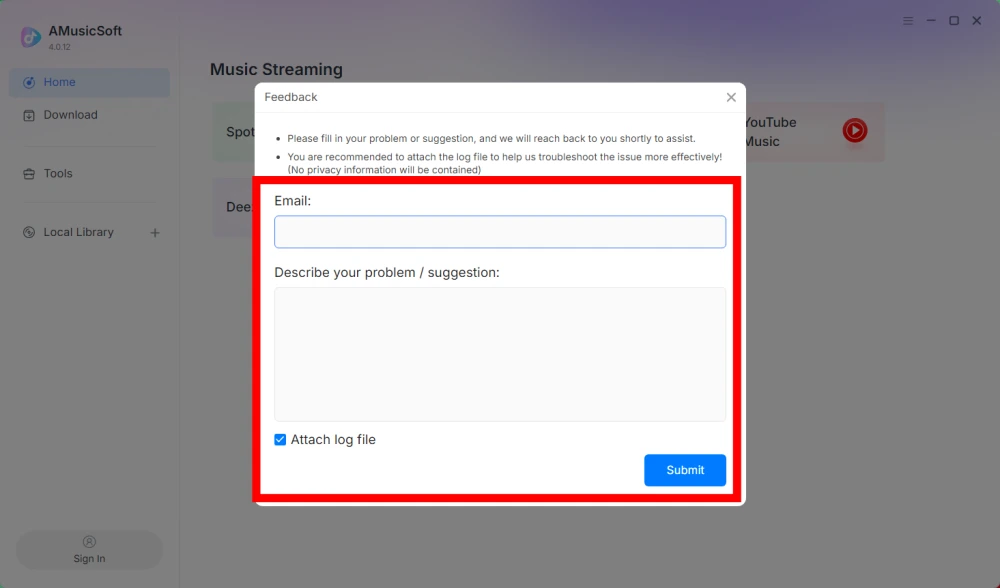
إذا واجهت مشكلة أثناء تنزيل أو تحويل الموسيقى، يُرجى إرسال سجل البرنامج ولقطة شاشة للخطأ إلى فريق الدعم لدينا. ستساعدنا هذه المعلومات في تحديد المشكلة وتقديم حل أسرع.
- انقر على القائمة الموجودة في أعلى يمين البرنامج واختر "إرسال ملاحظات".
- صف مشكلتك واكتب مفتاح الترخيص الخاص بك في مربع النص.
- وأخيرًا، يرجى تحديد خانة "إرفاق ملف السجل" قبل الإرسال.
الجزء 4. كيفية ضبط إعدادات الإخراج ومعلمات الصوت مسبقًا
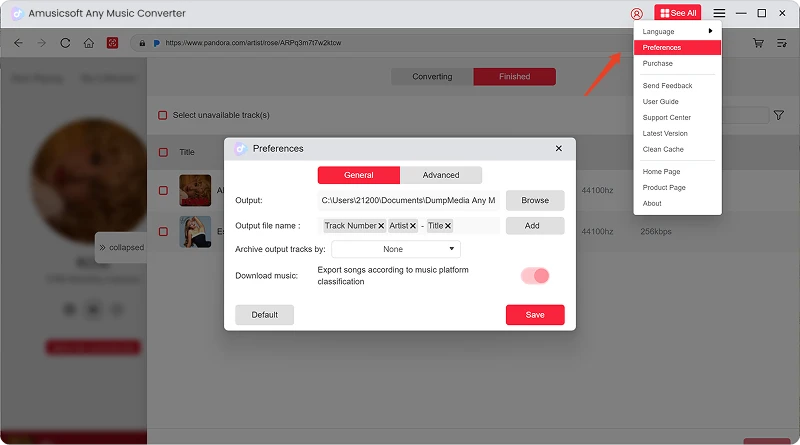
يتيح لك برنامج AMusicSoft Any Music Converter تخصيص إعدادات التنزيل ومعلمات الصوت للتحكم في عملية التحويل وجودة الإخراج. يمكنك ضبط هذه الإعدادات مباشرةً من قائمة التحويل قبل بدء التحويل، أو الانتقال إلى القائمة > التفضيلات لضبط المعلمات المفضلة لديك مسبقًا.
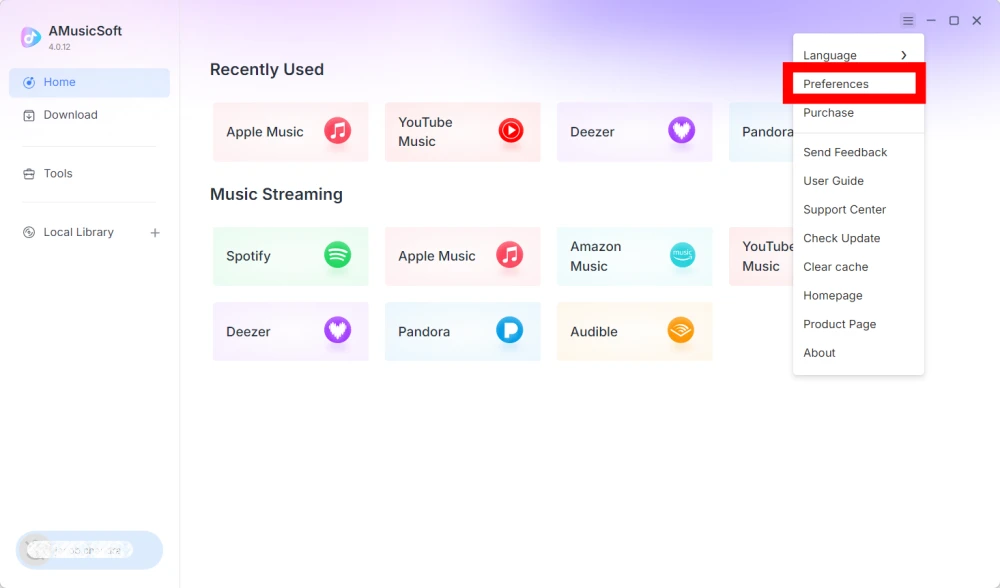
اللغة
اختر لغتك المفضلة لواجهة البرنامج.
إعدادات عامة
- المظهر - تخصيص مظهر واجهة البرنامج.
- مجلد الإخراج - حدد المجلد لحفظ الملفات المحولة.
- نمط التسمية التلقائية - تخصيص تنسيق تسمية الملفات.
- أرشفة حسب - اختر كيفية تنظيم الموسيقى التي تم تنزيلها.
- بعد التحويل - اختر ما يحدث بعد اكتمال عملية التحويل.
- حفظ الموسيقى - تفعيل أو تعطيل حفظ ملفات الموسيقى المحولة.
- كلمات الأغاني - تفعيل أو تعطيل حفظ كلمات الأغاني مع الموسيقى.
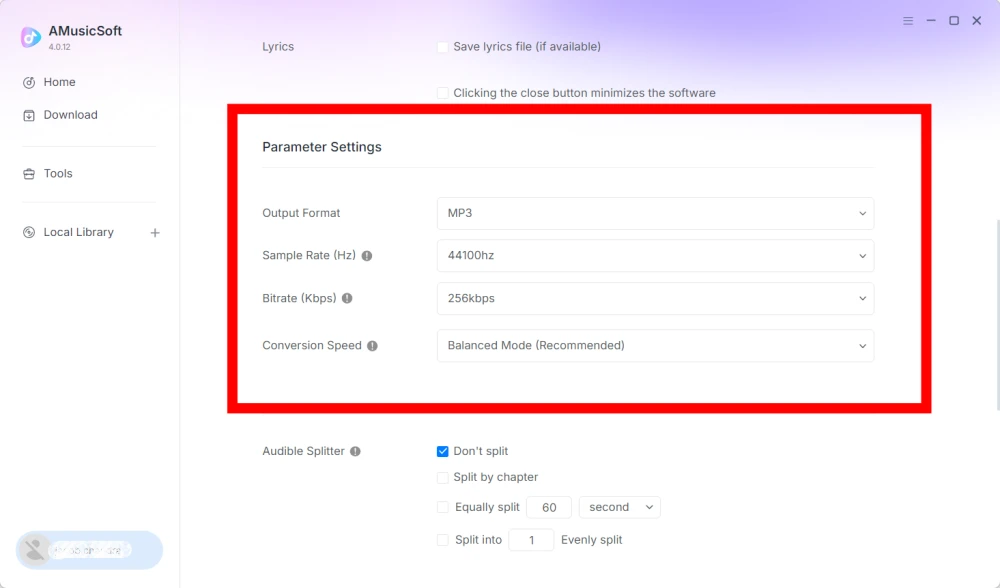
إعدادات المعلمات
- تنسيق الإخراج - حدد تنسيق إخراج الصوت المطلوب.
- معدل أخذ العينات (هرتز) - اضبط معدل أخذ عينات الصوت. (يتراوح من 22050 هرتز إلى 48000 هرتز.)
- معدل البت (كيلوبت في الثانية) - اضبط معدل بت الصوت للتحكم في جودة الإخراج. (يتراوح من 128 كيلوبت في الثانية إلى 320 كيلوبت في الثانية).
- سرعة التحويل - اضبط سرعة التحويل وفقًا لاحتياجاتك.
- برنامج Audible Splitter - لتقسيم الكتب الصوتية من Audible إلى أجزاء أصغر.
إعدادات التشغيل
خاصية الانتقال السلس بين الأغاني - تتيح هذه الخاصية الانتقال السلس بين الأغاني أثناء التشغيل.
اعدادات الشبكة
- التنزيلات المتزامنة - حدد عدد ملفات الموسيقى المراد تنزيلها في وقت واحد.
- الوكيل - قم بتكوين إعدادات الوكيل لاتصالات الشبكة.
إعدادات أخرى
النوافذ المنبثقة - تفعيل أو تعطيل الإشعارات المنبثقة.
الجزء 5. كيفية إدارة حساب AMusicSoft الخاص بك
يمكنك إدارة حسابك في AMusicSoft ومعلومات الاشتراك من مركز الحساب.
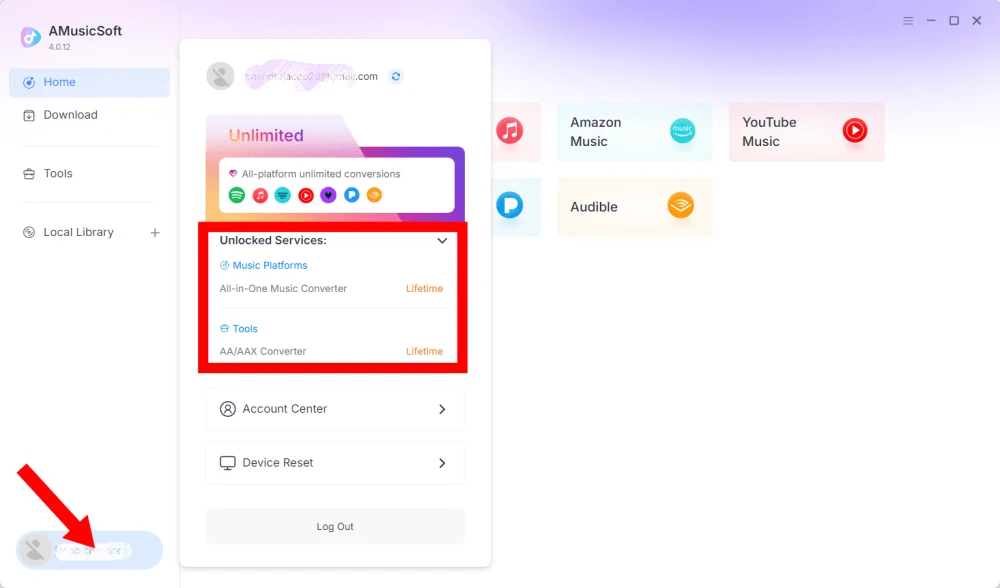
عرض الخدمات المتاحة
انقر على أيقونة الملف الشخصي في الزاوية السفلية اليسرى. بعد ذلك، يمكنك الاطلاع على الخدمات والميزات المتاحة حاليًا لحسابك.
مركز الوصول إلى الحساب
انقر فوق رمز الملف الشخصي > "مركز الحساب" للدخول إلى مركز حساب AMusicSoft، حيث يمكنك إدارة حسابك والمعلومات ذات الصلة.
- المعلومات الشخصية - حدّث اسم المستخدم الخاص بك وانقر على "تعديل" لتغيير صورة ملفك الشخصي. (استخدم زر "حذف الحساب" في الزاوية السفلية اليمنى بحذر. بمجرد حذف حسابك، سيتم تعطيل الحساب ومفتاح الترخيص المرتبط به فورًا. تأكد من عدم وجود اشتراك نشط لديك قبل المتابعة.)
- الاشتراكات - يمكنك عرض وإدارة اشتراكاتك الحالية. إذا كنت ترغب في إلغاء اشتراك، فما عليك سوى النقر على "إدارة الاشتراك" لإيقافه مؤقتًا. إذا لم تتمكن من الإلغاء، فيُرجى الاتصال بخدمة العملاء.[البريد الإلكتروني محمي]).
- إدارة الأجهزة - إذا كنت تنتقل إلى جهاز آخر وترغب في استخدام برنامج AMusicSoft عليه، يمكنك إتمام هذه المهمة بسهولة. في حال تعذر عليك إعادة الضبط، يُرجى التواصل مع خدمة العملاء.
- الفواتير - يمكنك الاطلاع على جميع تفاصيل الطلب. إذا لم تتمكن من مراجعة الفاتورة، يُرجى التواصل مع خدمة العملاء.
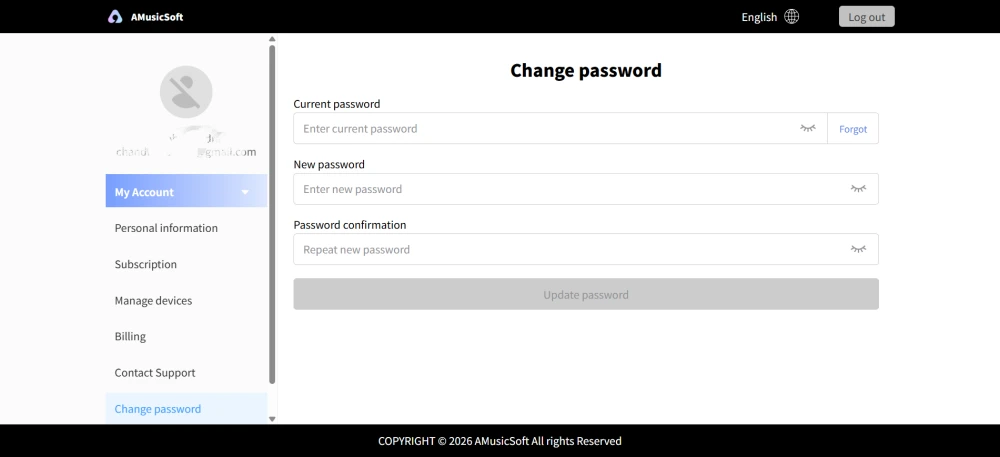
- تغيير كلمة المرور - عيّن كلمة المرور الجديدة التي تريدها. إذا نسيت كلمة مرورك الحالية، فانقر على "نسيت". اتبع التعليمات التي تظهر على الشاشة لإعادة تعيين كلمة مرورك.
الجزء 6. الأسئلة الشائعة
-
لا تشمل اشتراكات AMusicSoft أي اشتراكات في خدمات البث الموسيقي. للوصول إلى المقاطع الموسيقية وتحويلها، يجب على المستخدمين امتلاك حساباتهم الخاصة على خدمات البث الموسيقي أولاً. يعتمد توفر أي أغنية أو قائمة تشغيل أو ألبوم كلياً على حالة الاشتراك والصلاحيات الإقليمية لحساب البث الموسيقي الذي تستخدمه.
خدمات البث القائمة على الاشتراك (مثل Apple Music): يجب أن يكون لديك اشتراك نشط مرتبط بحسابك للوصول إلى المحتوى وتحويله من منصات البث المتميزة.
خدمات المستوى المجاني: بالنسبة لخدمات البث التي توفر وصولاً مجانياً (مثل Spotify)، يمكنك استخدام حساب مجاني للوصول إلى المسارات الموسيقية المتاحة وتحويلها. -
نعم. يمكنك ضبط تنسيق الإخراج ومعدل العينة ومعدل البت ومعلمات الصوت الأخرى مسبقًا من خلال القائمة > التفضيلات.
-
يتم حفظ الملفات المحولة افتراضياً في مجلد الإخراج المحدد. يمكنك تغيير موقع الحفظ من خلال الإعدادات العامة > مجلد الإخراج.
-
نعم. انتقل إلى إعدادات الشبكة > التنزيلات المتزامنة لضبط عدد التنزيلات المتزامنة.