Comment utiliser AMusicSoft Pandora Music Converter
Partie 1. Comment enregistrer AMusicSoft Pandora Music Converter
Étape 1. Téléchargez et installez AMusicSoft Pandora Music Converter
Vous pouvez télécharger le package d'installation depuis sa page produit ou simplement en cliquant sur le bouton de téléchargement ci-dessous. AMusicSoft Pandora Music Converter est actuellement compatible avec les appareils Mac et Windows.
Étape 2. Activez AMusicSoft Pandora Music Converter
Pour les utilisateurs de la version d'essai gratuite : Si vous utilisez la version d'essai gratuite, vous pouvez lancer le programme et découvrir ses fonctionnalités. La version d'essai vous permet de convertir jusqu'à 3 morceaux complets depuis Pandora Music. Pour convertir davantage de titres sans aucune limitation, vous devrez vous enregistrer et activer la version complète du logiciel. (Pour acheter une licence AMusicSoft, rendez-vous sur la boutique en ligne AMusicSoft . Les utilisateurs de la version d'essai gratuite peuvent également contacter notre service client pour connaître les dernières promotions et offres spéciales.)
Pour les utilisateurs payants : cliquez sur l’icône de profil en bas à gauche. Sélectionnez ensuite « Se connecter avec une licence ». Saisissez l’adresse e-mail utilisée pour l’achat du logiciel et votre code d’enregistrement/clé de licence. Cliquez sur « Se connecter » pour terminer l’activation.
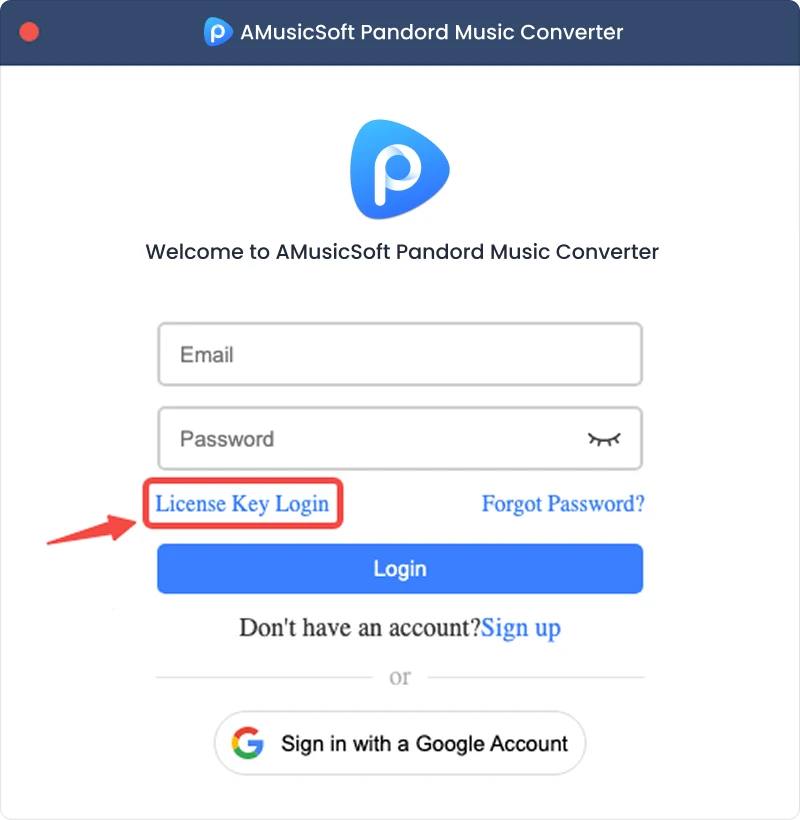
Remarque : Veuillez saisir la même adresse courriel que celle associée à votre achat et utiliser le code d’enregistrement correct. Une connexion Internet active peut être requise pour la vérification.
Partie 2. Comment convertir la musique Pandora au format de votre choix
Étape 1. Sélectionnez Pandora Music
Lancez AMusicSoft Pandora Music Converter. Sur l'interface principale, sélectionnez Pandora Music.
Étape 2. Connectez-vous à Pandora Music
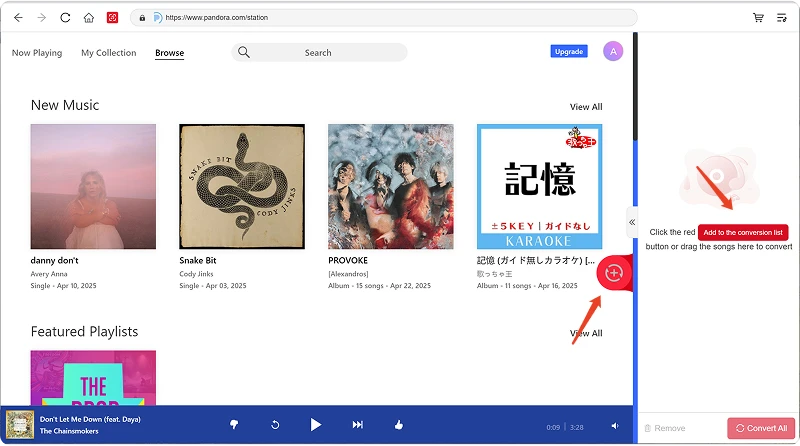
AMusicSoft Pandora Music Converter intègre les lecteurs web officiels des plateformes musicales compatibles. Après avoir sélectionné Pandora Music, connectez-vous avec votre compte Pandora pour rechercher et télécharger de la musique.
Étape 3. Ajouter de la musique au programme
Après vous être connecté(e), parcourez votre bibliothèque musicale et sélectionnez les morceaux, listes de lecture, albums ou podcasts que vous souhaitez convertir. Cliquez sur « Ajouter à la liste de conversion » à côté d'un titre ou d'une liste de lecture pour l'ajouter, ou glissez-déposez le fichier audio sur l'icône « + » flottante.
Disponibilité du contenu : La disponibilité de chaque chanson ou album dépend entièrement de votre abonnement et des autorisations régionales du compte que vous utilisez.
Étape 4. Sélectionnez le format de sortie et personnalisez les paramètres de sortie
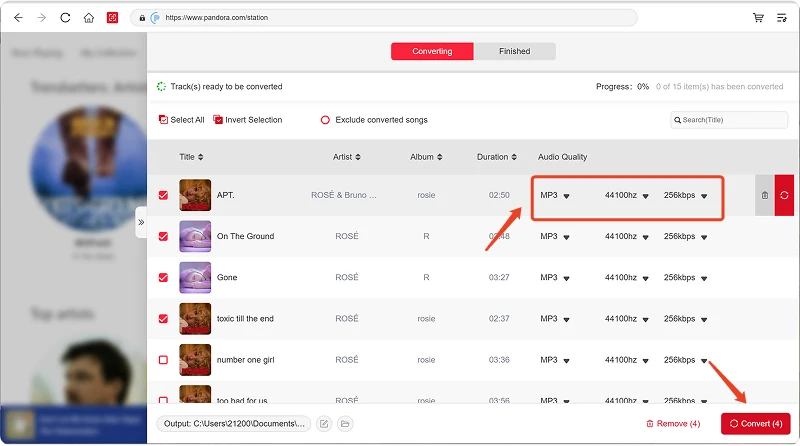
Après avoir ajouté votre musique, ouvrez le menu Format de sortie pour choisir le format souhaité. AMusicSoft Pandora Music Converter vous permet également d'ajuster les paramètres de sortie disponibles selon vos besoins, tels que le débit binaire, la fréquence d'échantillonnage, etc. Enfin, cliquez sur l'option de sélection du dossier de sortie et choisissez l'emplacement où enregistrer les fichiers. Si vous n'êtes pas familiarisé avec ces paramètres, vous pouvez conserver la configuration par défaut pour une conversion plus simple.
Étape 5. Commencez la conversion de la musique
Une fois tous les paramètres configurés, vérifiez votre liste de conversion et cliquez sur le bouton Convertir. Le logiciel commencera le traitement des fichiers musicaux sélectionnés. Les informations de progression vous permettent de suivre l'état de la conversion. Pour les conversions par lots, vous pouvez ajouter plusieurs morceaux et les traiter ensemble au lieu de convertir chaque fichier individuellement.
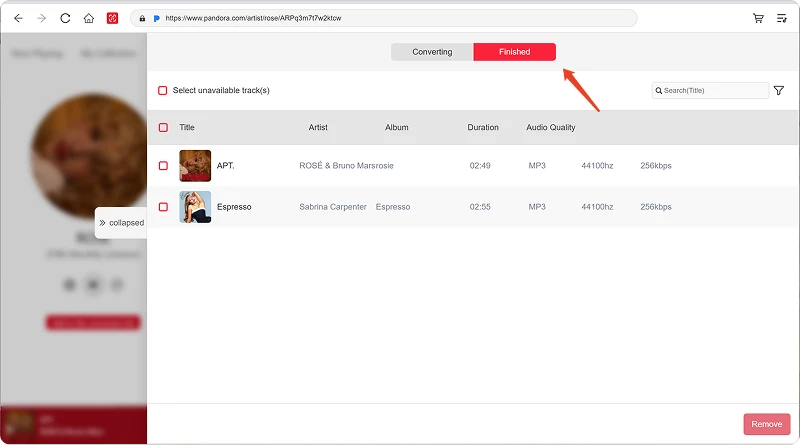
Étape 6. Trouvez la musique convertie
Une fois la conversion terminée, ouvrez le dossier de sortie sélectionné pour accéder à vos fichiers convertis. Vous pourrez ensuite les transférer vers des appareils compatibles, les organiser dans votre bibliothèque musicale locale ou les lire avec des lecteurs multimédias compatibles.
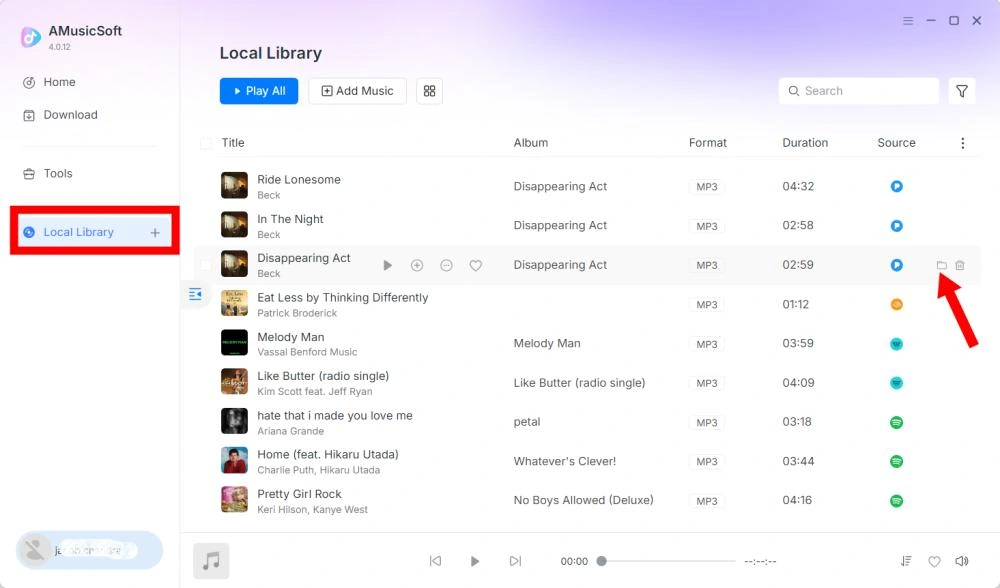
Partie 3. Que faire si je ne peux pas télécharger de musique ?
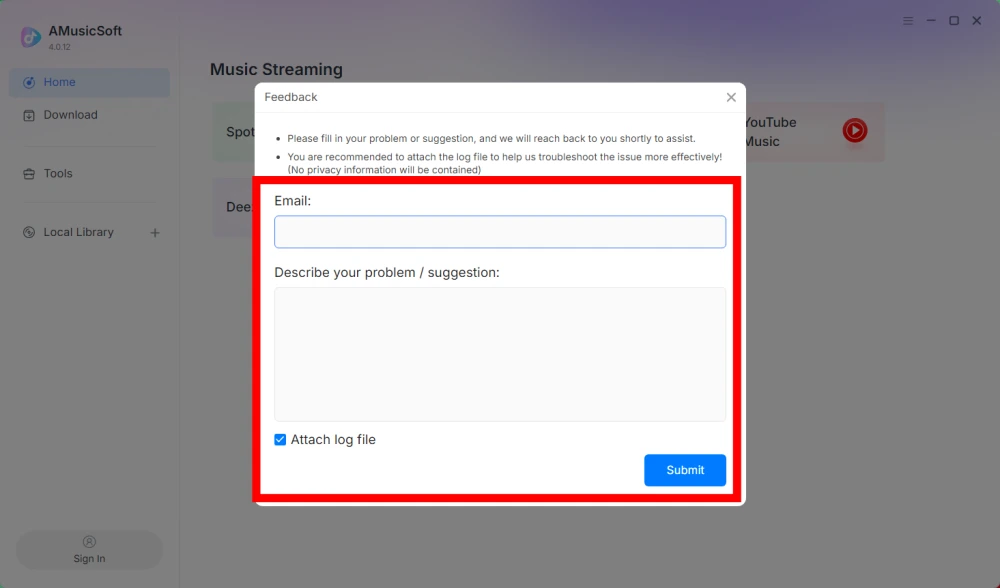
Si vous rencontrez un problème lors du téléchargement ou de la conversion de musique, veuillez transmettre le journal du logiciel et une capture d'écran de l'erreur à notre équipe d'assistance. Ces informations nous aideront à identifier le problème et à vous apporter une solution plus rapidement.
- Cliquez sur le menu en haut à droite du programme et choisissez « Envoyer des commentaires ».
- Décrivez votre problème et inscrivez votre clé de licence dans la zone de texte.
- Enfin, veuillez cocher la case « Joindre le fichier journal » avant de soumettre.
Partie 4. Comment prérégler les paramètres de sortie et les paramètres audio
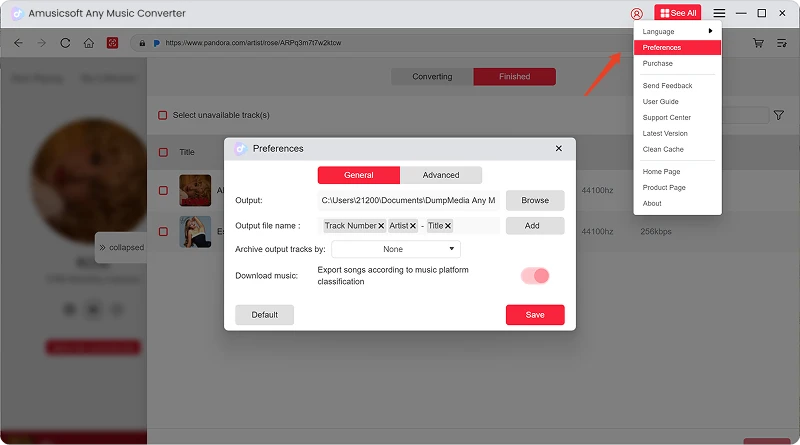
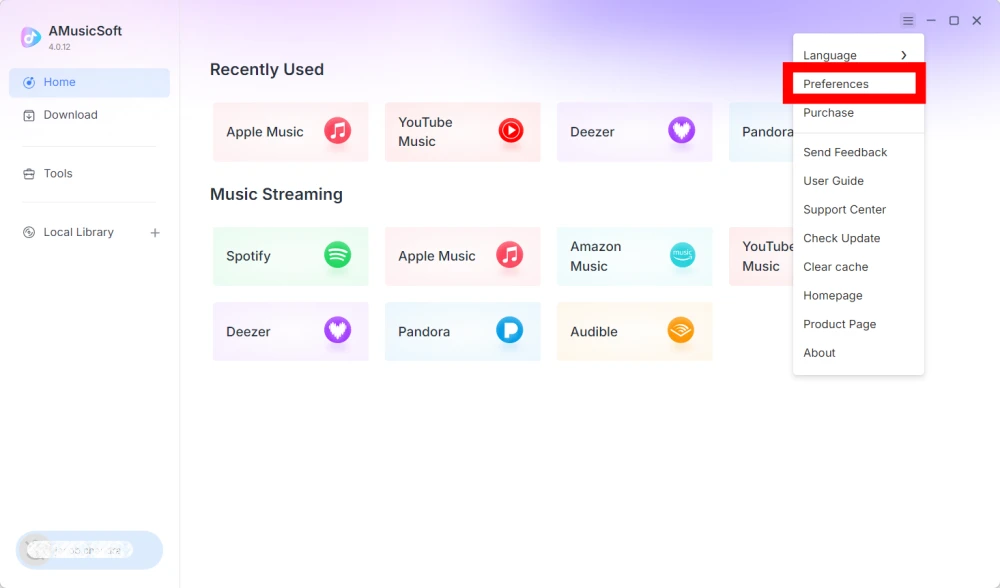
AMusicSoft Any Music Converter vous permet de personnaliser les paramètres de téléchargement et les paramètres audio afin de contrôler le processus de conversion et la qualité de sortie. Vous pouvez ajuster ces paramètres directement depuis la liste de conversion avant de lancer une conversion, ou accéder à Menu > Préférences pour prédéfinir vos paramètres préférés.
Langue
Sélectionnez la langue de votre choix pour l'interface du logiciel.
Paramètres généraux
- Apparence - Personnalisez l'apparence de l'interface du logiciel.
- Dossier de sortie - Sélectionnez le dossier dans lequel enregistrer les fichiers convertis.
- Modèle de nommage automatique - Personnalisez le format de nommage des fichiers.
- Archivage par - Choisissez comment organiser la musique téléchargée.
- Après la conversion - Choisissez ce qui se passe une fois la conversion terminée.
- Enregistrer la musique - Activer ou désactiver l'enregistrement des fichiers musicaux convertis.
- Paroles - Activer ou désactiver l'enregistrement des paroles avec la musique.
Paramétrage
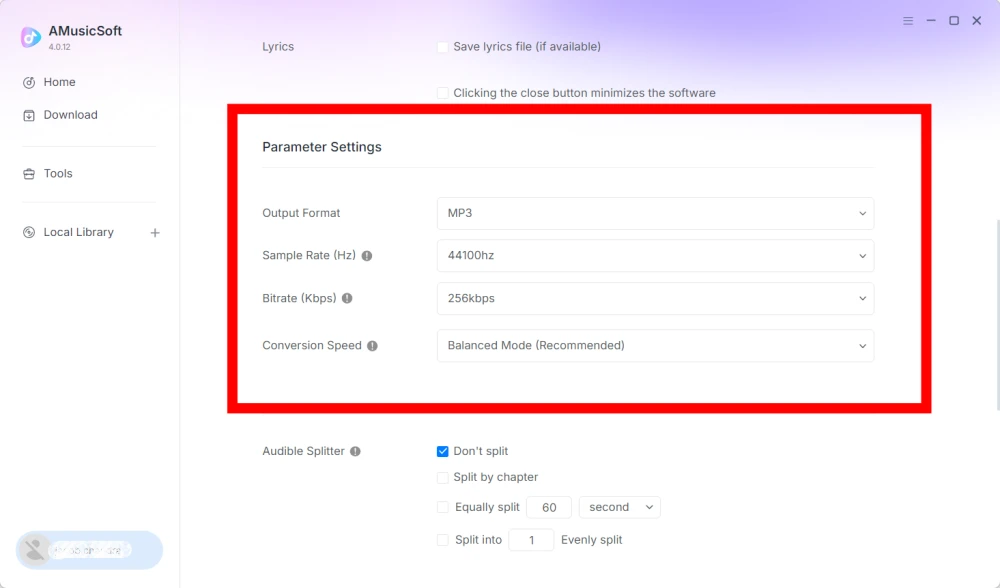
- Format de sortie - Sélectionnez le format de sortie audio souhaité.
- Fréquence d'échantillonnage (Hz) - Réglez la fréquence d'échantillonnage audio. (Plage de 22 050 Hz à 48 000 Hz.)
- Débit binaire (Kbps) - Réglez le débit binaire audio pour contrôler la qualité de sortie. (Plage de 128 Kbps à 320 Kbps.)
- Vitesse de conversion - Ajustez la vitesse de conversion selon vos besoins.
- Audible Splitter - Divisez les livres audio Audible en sections plus petites.
Paramètres de lecture
Fondu enchaîné entre les morceaux - Permet une transition fluide entre les morceaux pendant la lecture.
Paramètres réseau
- Téléchargements simultanés - Définissez le nombre de fichiers musicaux à télécharger simultanément.
- Proxy - Configurer les paramètres de proxy pour les connexions réseau.
Autres réglages
Fenêtres contextuelles - Activer ou désactiver les notifications contextuelles.
Partie 5. Comment gérer votre compte AMusicSoft
Vous pouvez gérer les informations relatives à votre compte AMusicSoft et à votre abonnement depuis le centre de compte.
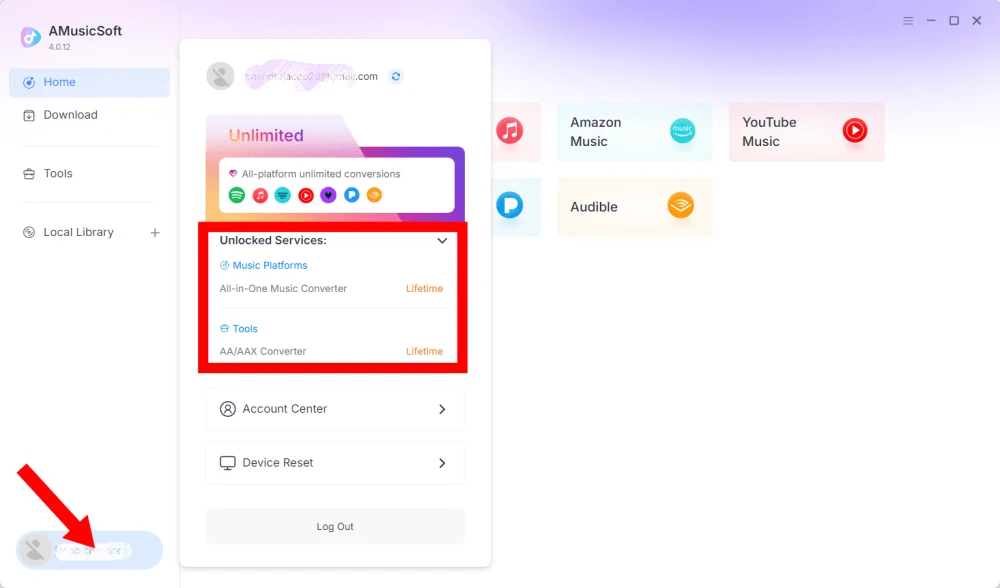
Afficher les services déverrouillés
Cliquez sur l'icône de profil en bas à gauche. Vous pourrez alors consulter les services et fonctionnalités actuellement débloqués avec votre compte.
Accédez à votre compte
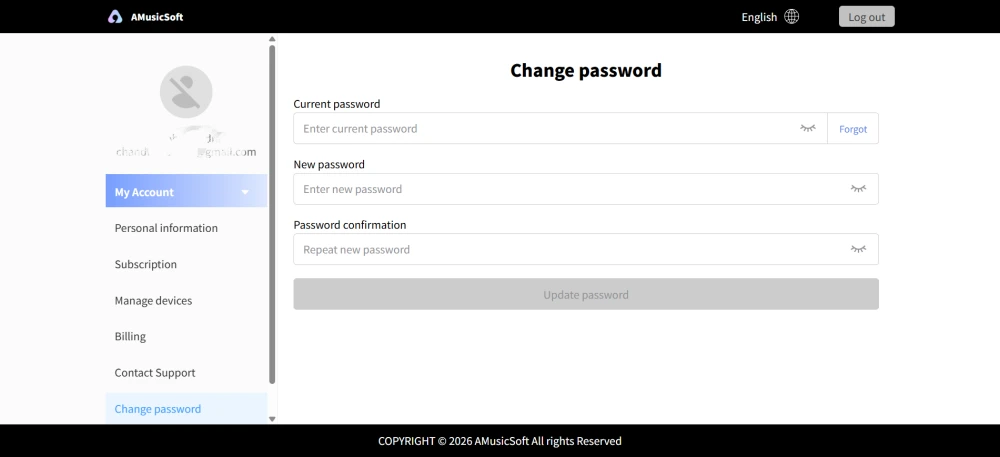
Cliquez sur l'icône de profil > « Centre de compte » pour accéder au Centre de compte AMusicSoft, où vous pourrez gérer votre compte et les informations associées.
- Informations personnelles - Mettez à jour votre nom d'utilisateur et cliquez sur « Modifier » pour changer votre photo de profil. (Utilisez le bouton « Supprimer le compte » en bas à droite avec précaution. Une fois votre compte supprimé, celui-ci et la clé de licence associée seront immédiatement désactivés. Assurez-vous de n'avoir aucun abonnement actif avant de continuer.)
- Abonnement - Consultez et gérez vos abonnements en cours. Si vous souhaitez annuler un abonnement, cliquez simplement sur « Gérer l'abonnement » pour le suspendre. Si vous ne parvenez pas à annuler, veuillez contacter le service client ([email protected]).
- Gestion des appareils : si vous changez d’appareil et souhaitez utiliser AMusicSoft sur ce nouvel appareil, vous pouvez facilement effectuer la procédure. En cas de problème de réinitialisation, veuillez contacter le service client.
- Facturation - Vous trouverez tous les détails de votre commande. Si vous ne parvenez pas à consulter votre facture, veuillez contacter le service client.
- Changer le mot de passe : définissez le nouveau mot de passe de votre choix. Si vous avez oublié votre mot de passe actuel, cliquez sur « Mot de passe oublié ». Suivez les instructions à l’écran pour réinitialiser votre mot de passe.
Partie 6. QFP
-
Les abonnements AMusicSoft n'incluent aucun abonnement à un service de streaming. Pour accéder aux morceaux et les convertir, les utilisateurs doivent posséder un compte sur un service de streaming. La disponibilité de chaque chanson, playlist ou album dépend entièrement de votre abonnement et des autorisations régionales du service de streaming utilisé.
Services de streaming par abonnement (ex. : Apple Music) : vous devez disposer d’un abonnement actif lié à votre compte pour accéder au contenu des plateformes de streaming premium et le convertir.
Services gratuits : Pour les services de streaming offrant un accès gratuit (par exemple, Spotify), vous pouvez utiliser un compte gratuit pour accéder aux morceaux de musique disponibles et les convertir. -
Oui. Vous pouvez prédéfinir le format de sortie, la fréquence d'échantillonnage, le débit binaire et d'autres paramètres audio dans Menu > Préférences.
-
Par défaut, les fichiers convertis sont enregistrés dans le dossier de sortie désigné. Vous pouvez modifier cet emplacement dans Paramètres généraux > Dossier de sortie.
-
Oui. Accédez à Paramètres réseau > Téléchargements simultanés pour ajuster le nombre de téléchargements simultanés.