Hoe gebruik je AMusicSoft Pandora Music Converter?
Deel 1. Hoe registreer ik AMusicSoft Pandora Music Converter?
Stap 1. Download en installeer AMusicSoft Pandora Music Converter
Je kunt het installatiepakket downloaden via de productpagina of door simpelweg op de downloadknop hier te klikken. AMusicSoft Pandora Music Converter wordt momenteel ondersteund op Mac- en Windows-apparaten.
Stap 2. Activeer AMusicSoft Pandora Music Converter
Voor gebruikers van de gratis proefversie: Als u de gratis proefversie gebruikt, kunt u het programma direct starten en de beschikbare functies verkennen. Met de gratis proefversie kunt u maximaal 3 volledige nummers van Pandora Music converteren. Om meer nummers zonder beperkingen te converteren, moet u zich registreren en de volledige versie van de software activeren. (U kunt de AMusicSoft-licentie kopen via de AMusicSoft Online Store . Gebruikers van de gratis proefversie kunnen ook contact opnemen met onze klantenservice voor meer informatie over de nieuwste acties en speciale aanbiedingen.)
Voor betalende gebruikers: Klik op het profielpictogram in de linkerbenedenhoek. Kies vervolgens 'Inloggen met licentie'. Voer het e-mailadres in waarmee u de software hebt aangeschaft en uw registratiecode/licentiesleutel. Klik op 'Inloggen' om de activering te voltooien.
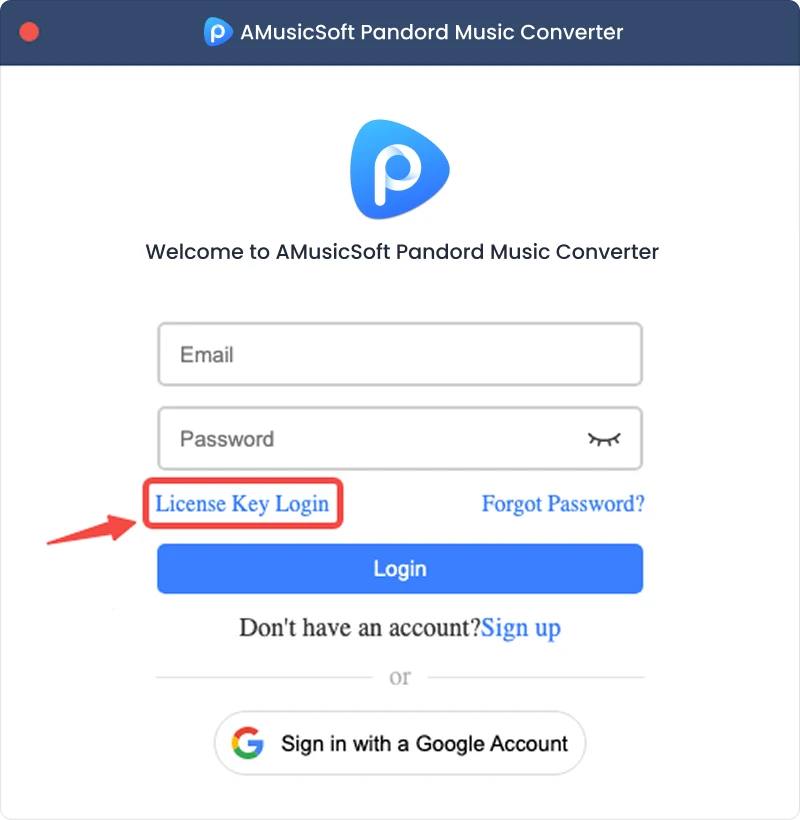
Let op: Zorg ervoor dat u hetzelfde e-mailadres gebruikt als bij uw aankoop en dat u de juiste registratiecode invoert. Een actieve internetverbinding kan vereist zijn voor verificatie.
Deel 2. Hoe converteer je Pandora-muziek naar het formaat van je keuze?
Stap 1. Selecteer Pandora Muziek
Start AMusicSoft Pandora Music Converter. Selecteer in de hoofdinterface Pandora Music.
Stap 2. Log in bij Pandora Music.
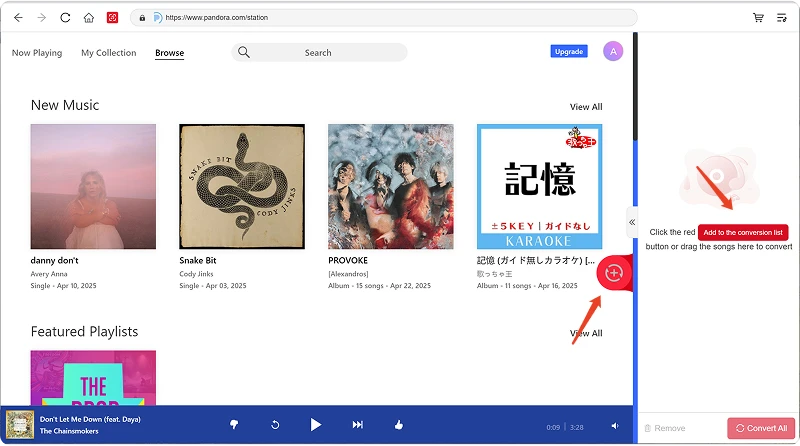
AMusicSoft Pandora Music Converter integreert de officiële webspelers van ondersteunde muziekplatformen. Nadat u Pandora Music hebt geselecteerd, kunt u inloggen met uw Pandora Music-account om muziek te zoeken en te downloaden.
Stap 3. Muziek aan het programma toevoegen
Na het inloggen kunt u door uw muziekbibliotheek bladeren en de nummers, afspeellijsten, albums of podcasts selecteren die u wilt converteren. Klik op 'Toevoegen aan conversie' naast een nummer of afspeellijst om deze aan de conversielijst toe te voegen, of sleep de muziek naar het zwevende '+' pictogram.
Beschikbaarheid van content: De beschikbaarheid van een nummer of album is volledig afhankelijk van de abonnementsstatus en de regionale instellingen van het account dat u gebruikt.
Stap 4. Selecteer het uitvoerformaat en pas de uitvoerinstellingen aan.
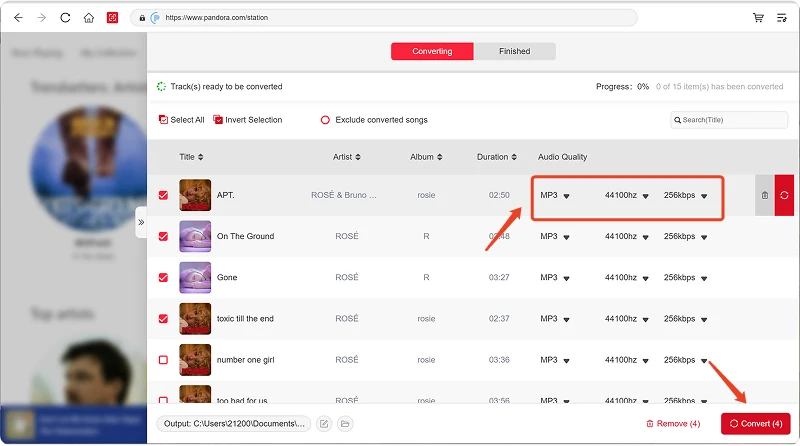
Nadat je je muziek hebt toegevoegd, open je het menu 'Uitvoerformaat' om het gewenste formaat te kiezen. AMusicSoft Pandora Music Converter biedt je ook de mogelijkheid om de beschikbare uitvoerparameters aan te passen aan je behoeften, zoals bitrate, samplefrequentie en andere instellingen. Klik ten slotte op de optie voor het selecteren van het uitvoerpad of de map en kies waar je de bestanden wilt opslaan. Als je niet bekend bent met deze instellingen, kun je de standaardconfiguratie behouden voor een eenvoudiger conversieproces.
Stap 5. Begin met het converteren van muziek.
Zodra alle instellingen geconfigureerd zijn, controleer je de lijst met te converteren bestanden en klik je op de knop 'Converteren'. De software begint vervolgens met het verwerken van de geselecteerde muziekbestanden. De voortgangsinformatie geeft je de mogelijkheid om de conversiestatus te volgen. Voor batchconversies kun je meerdere nummers toevoegen en deze samen verwerken in plaats van elk bestand afzonderlijk te converteren.
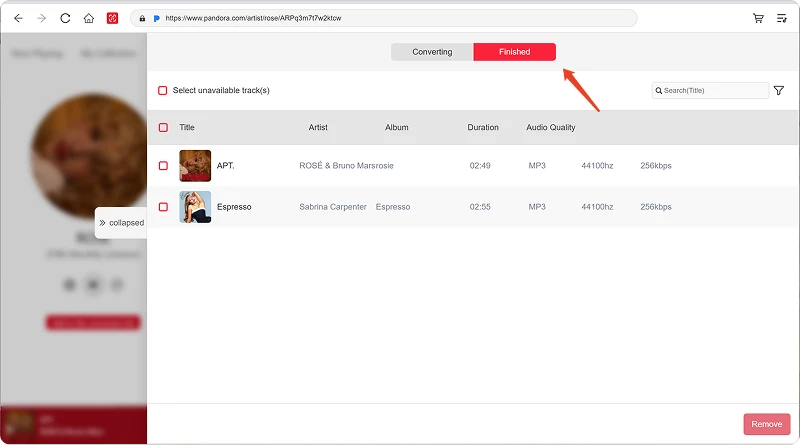
Stap 6. Zoek de geconverteerde muziek
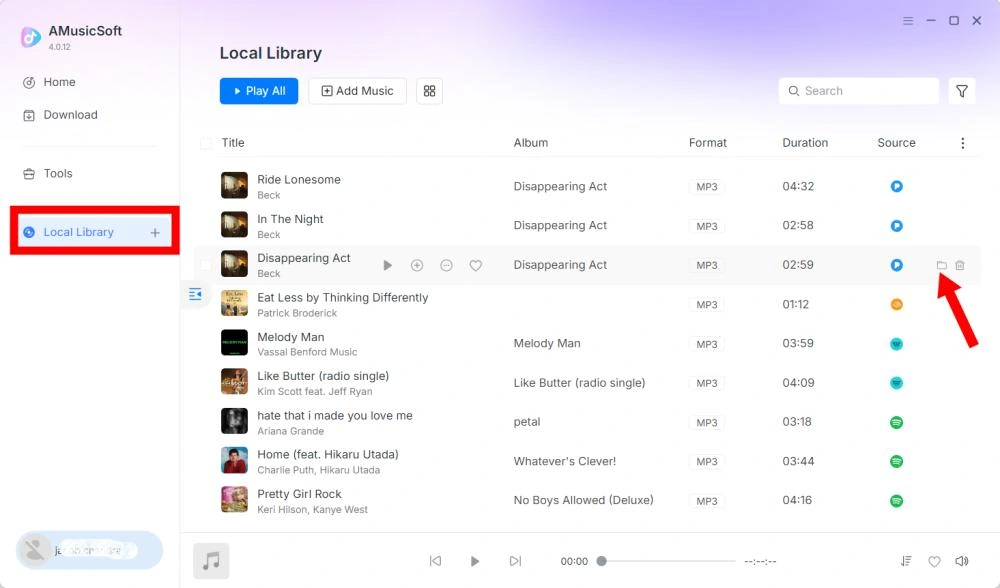
Zodra de conversie is voltooid, opent u de geselecteerde uitvoermap om uw geconverteerde bestanden te bekijken. U kunt de bestanden vervolgens overzetten naar compatibele apparaten, ze ordenen in uw lokale muziekbibliotheek of ze afspelen met ondersteunde mediaspelers.
Deel 3. Wat moet ik doen als ik geen muziek kan downloaden?
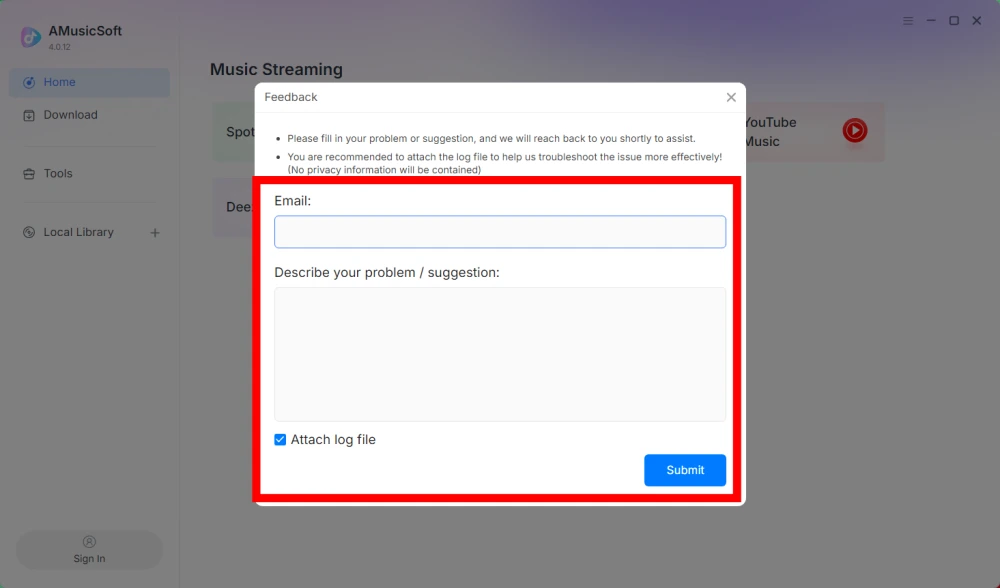
Als u problemen ondervindt tijdens het downloaden of converteren van muziek, stuur dan het softwarelogboek en een schermafbeelding van de foutmelding naar ons supportteam. Deze informatie helpt ons het probleem te identificeren en sneller een oplossing te bieden.
- Klik op het menu rechtsboven in het programma en kies 'Feedback verzenden'.
- Beschrijf uw probleem en noteer uw licentiesleutel in het tekstvak.
- Vink tot slot het vakje 'Logbestand bijvoegen' aan voordat u het formulier verzendt.
Deel 4. Hoe u uitvoerinstellingen en audioparameters vooraf kunt instellen
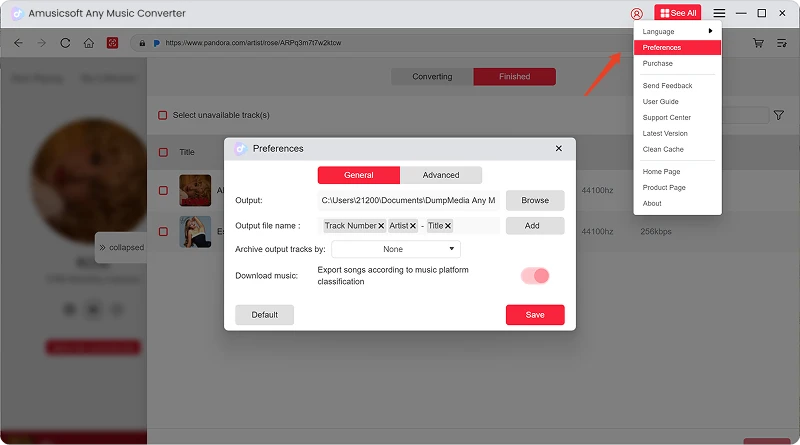
Met AMusicSoft Any Music Converter kunt u de downloadinstellingen en audioparameters aanpassen om het conversieproces en de uitvoerkwaliteit te bepalen. U kunt deze instellingen rechtstreeks in de conversielijst aanpassen voordat u een conversie start, of naar Menu > Voorkeuren gaan om uw gewenste parameters vooraf in te stellen.
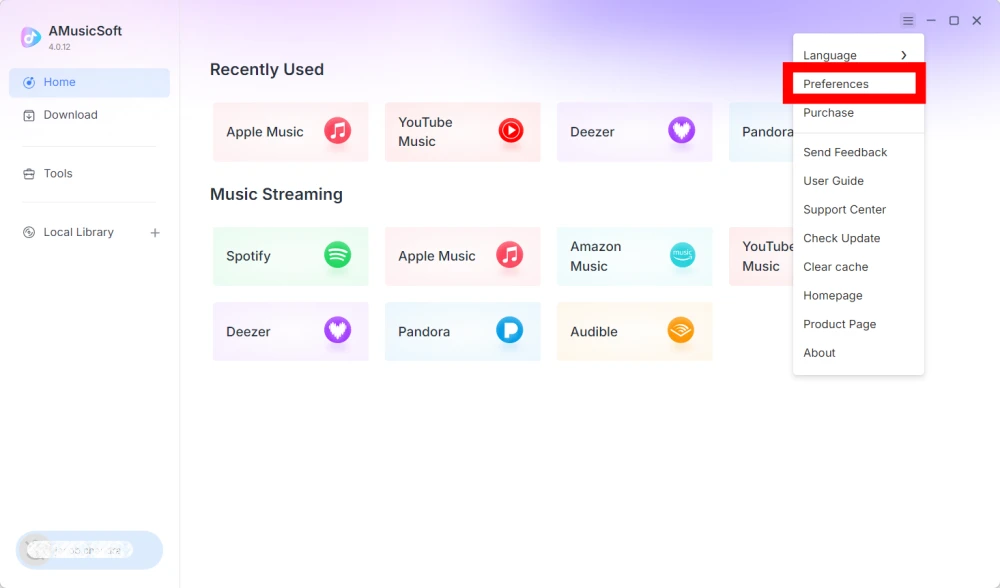
Taal
Selecteer de gewenste taal voor de software-interface.
Algemene instellingen
- Uiterlijk - Pas het uiterlijk van de software-interface aan.
- Uitvoermap - Selecteer de map waarin de geconverteerde bestanden worden opgeslagen.
- Automatisch naamgevingspatroon - Pas de bestandsnaamindeling aan.
- Archiveren op - Kies hoe u gedownloade muziek wilt ordenen.
- Na de conversie - Kies wat er gebeurt nadat de conversie is voltooid.
- Muziek opslaan - Schakel het opslaan van geconverteerde muziekbestanden in of uit.
- Songteksten - Schakel het opslaan van songteksten bij de muziek in of uit.
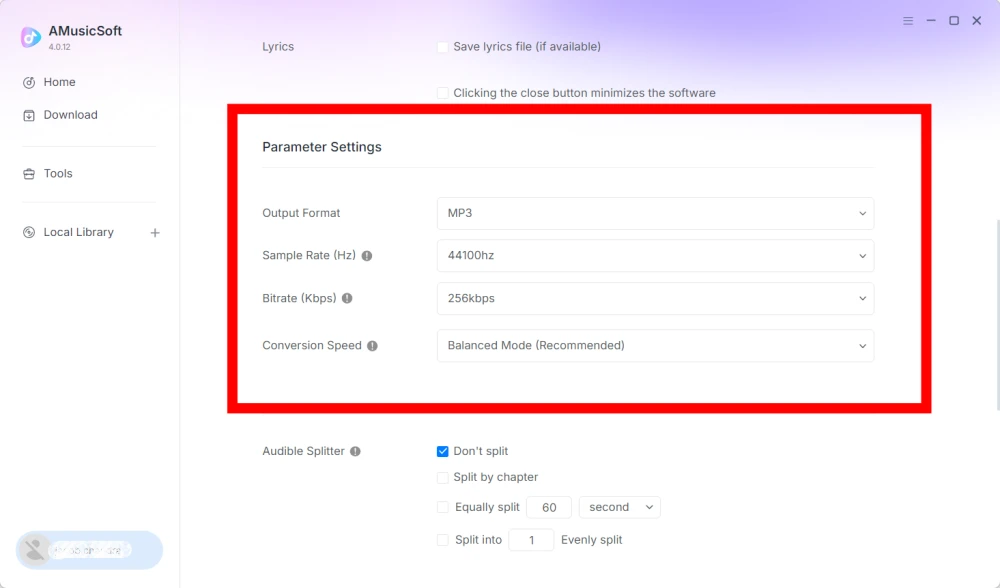
Parameterinstellingen
- Uitvoerformaat - Selecteer het gewenste audio-uitvoerformaat.
- Samplefrequentie (Hz) - Stel de audiosamplefrequentie in. (Bereik van 22050 Hz tot 48000 Hz.)
- Bitrate (Kbps) - Stel de audiobitrate in om de uitvoerkwaliteit te regelen. (Vast van 128 Kbps tot 320 Kbps.)
- Conversiesnelheid - Pas de conversiesnelheid aan uw behoeften aan.
- Audible Splitter - Splits Audible-audioboeken in kleinere delen.
Playback-instellingen
Crossfade-functie voor nummers - Maakt een vloeiende overgang tussen nummers mogelijk tijdens het afspelen.
Netwerkinstellingen
- Gelijktijdige downloads - Stel het aantal muziekbestanden in dat u tegelijkertijd wilt downloaden.
- Proxy - Configureer de proxy-instellingen voor netwerkverbindingen.
Andere instellingen
Pop-ups - Pop-upmeldingen in- of uitschakelen.
Deel 5. Hoe beheer ik mijn AMusicSoft-account?
U kunt uw AMusicSoft-account en abonnementsgegevens beheren via het accountcentrum.
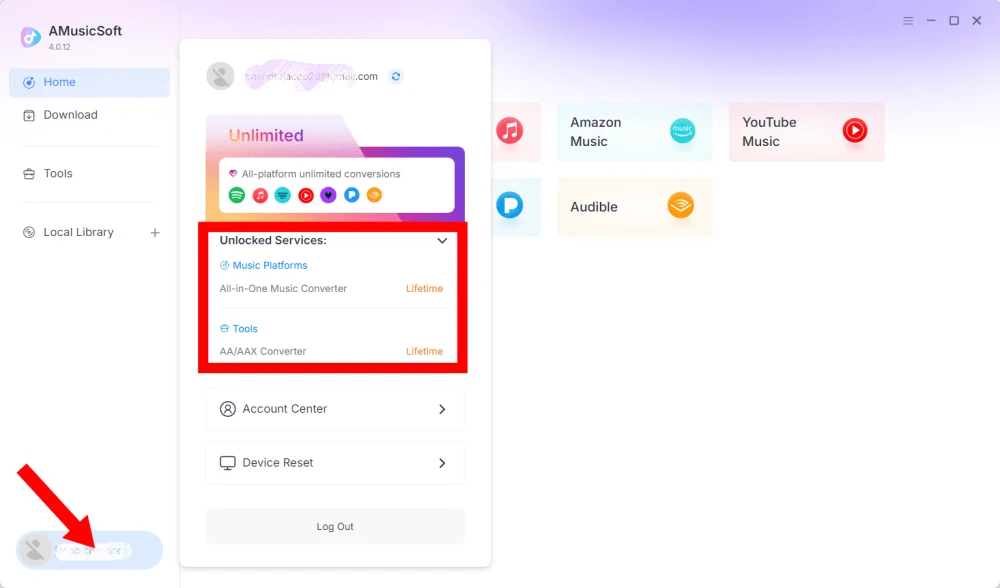
Bekijk ontgrendelde services
Klik op het profielpictogram in de linkerbenedenhoek. Daar kunt u zien welke services en functies momenteel voor uw account beschikbaar zijn.
Toegang tot het accountcentrum
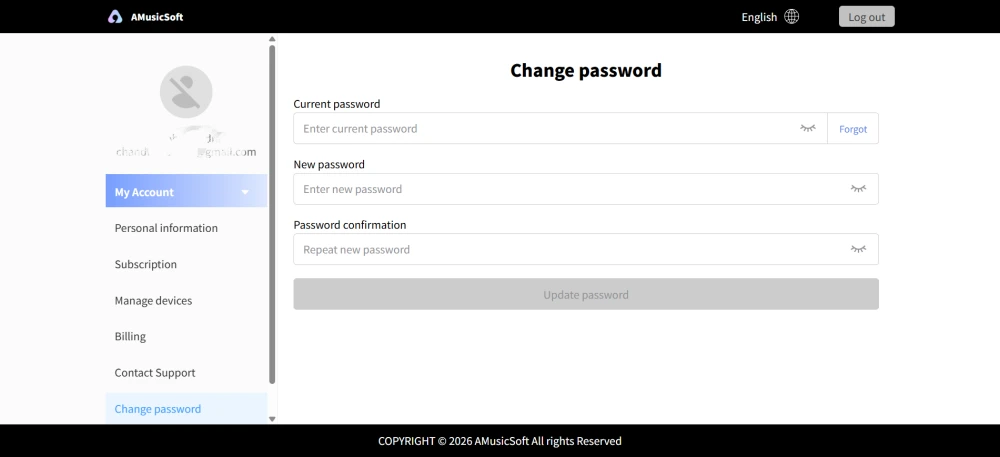
Klik op het profielpictogram > "Accountcentrum" om naar het AMusicSoft-accountcentrum te gaan, waar u uw account en gerelateerde informatie kunt beheren.
- Persoonlijke gegevens - Werk uw gebruikersnaam bij en klik op 'bewerken' om uw avatarfoto te wijzigen. (Gebruik de knop 'Account verwijderen' rechtsonder met de nodige voorzichtigheid. Zodra uw account is verwijderd, worden het account en de bijbehorende licentiesleutel onmiddellijk gedeactiveerd. Zorg ervoor dat u geen actief abonnement hebt voordat u verdergaat.)
- Abonnementen - Bekijk en beheer uw huidige abonnementen. Als u een abonnement wilt annuleren, klikt u op 'Abonnement beheren' om het te pauzeren. Als u niet kunt annuleren, neem dan contact op met de klantenservice.[e-mail beveiligd]).
- Apparaten beheren - Als u overstapt naar een ander apparaat en AMusicSoft op het nieuwe apparaat wilt gebruiken, kunt u dit eenvoudig doen. Als het resetten niet lukt, neem dan contact op met de klantenservice.
- Facturering - Alle bestelgegevens vindt u hier. Als u de factuur niet kunt controleren, neem dan contact op met de klantenservice.
- Wachtwoord wijzigen - Stel een nieuw wachtwoord in. Als u uw huidige wachtwoord bent vergeten, klik dan op 'Vergeten'. Volg de instructies op het scherm om uw wachtwoord opnieuw in te stellen.
Deel 6. FAQ
-
De abonnementen van AMusicSoft omvatten geen abonnementen op streamingdiensten. Om muzieknummers te kunnen beluisteren en converteren, moeten gebruikers eerst een eigen account bij een streamingdienst hebben. De beschikbaarheid van een nummer, afspeellijst of album is volledig afhankelijk van de abonnementsstatus en regionale instellingen van het streamingaccount dat u gebruikt.
Streamingdiensten op abonnementsbasis (bijv. Apple Music): Je moet een actief abonnement hebben dat aan je account is gekoppeld om toegang te krijgen tot content van betaalde streamingplatforms en deze te kunnen converteren.
Gratis streamingdiensten: Bij streamingdiensten die gratis toegang bieden (bijvoorbeeld Spotify), kun je een gratis account gebruiken om toegang te krijgen tot beschikbare muzieknummers en deze te converteren. -
Ja. Je kunt het uitvoerformaat, de samplefrequentie, de bitrate en andere audioparameters vooraf instellen via Menu > Voorkeuren.
-
Standaard worden geconverteerde bestanden opgeslagen in de opgegeven uitvoermap. U kunt de locatie wijzigen onder Algemene instellingen > Uitvoermap.
-
Ja. Ga naar Netwerkinstellingen > Gelijktijdige downloads om het aantal gelijktijdige downloads aan te passen.