Как использовать конвертер музыки AMusicSoft Pandora
Часть 1. Как зарегистрировать AMusicSoft Pandora Music Converter
Шаг 1. Скачайте и установите AMusicSoft Pandora Music Converter.
Вы можете скачать установочный пакет со страницы продукта или просто нажав на кнопку загрузки, расположенную здесь. AMusicSoft Pandora Music Converter в настоящее время поддерживается на устройствах Mac и Windows.
Шаг 2. Активируйте AMusicSoft Pandora Music Converter.
Для пользователей бесплатной пробной версии: Если вы используете бесплатную пробную версию, вы можете сразу запустить программу и ознакомиться с ее доступными функциями. В бесплатной пробной версии вы можете конвертировать только 3 полные песни из Pandora Music. Для конвертации большего количества треков без ограничений вам потребуется зарегистрироваться и активировать полную версию программного обеспечения. (Чтобы приобрести лицензию AMusicSoft, вы можете перейти в онлайн-магазин AMusicSoft . Пользователи бесплатной пробной версии также могут связаться с нашей службой поддержки клиентов, чтобы узнать о последних акциях и специальных предложениях.)
Для платных пользователей: Щелкните значок профиля в левом нижнем углу. Затем выберите «Войти с помощью лицензии». Введите адрес электронной почты, использованный при покупке программного обеспечения, и ваш регистрационный код/лицензионный ключ. Нажмите «Войти», чтобы завершить активацию.
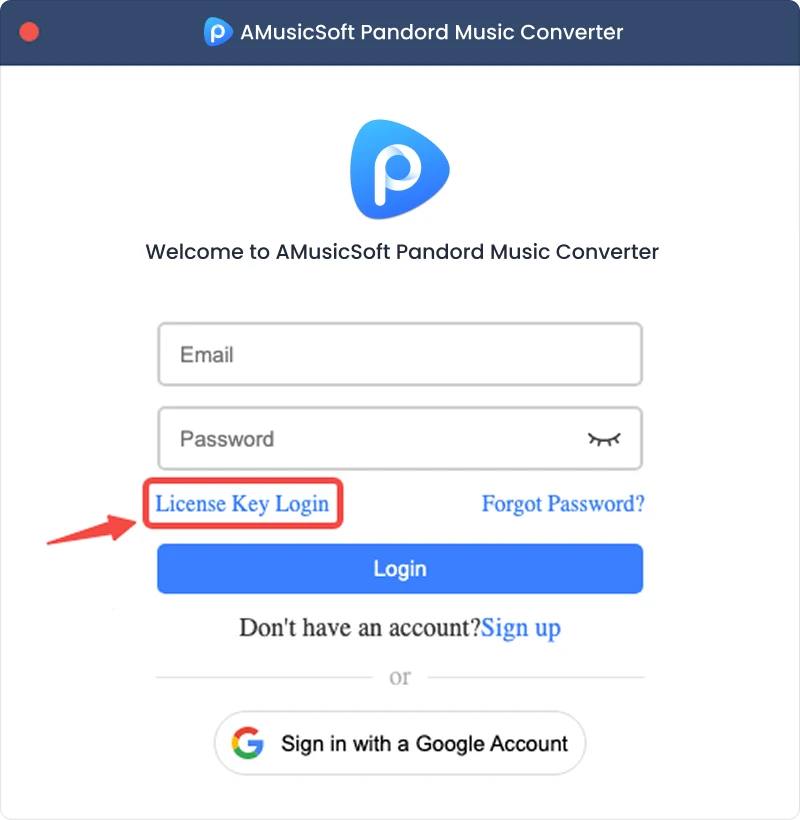
Примечание: Убедитесь, что вы ввели тот же адрес электронной почты, который был указан при покупке, и использовали правильный регистрационный код. Для подтверждения может потребоваться активное подключение к Интернету.
Часть 2. Как конвертировать музыку из Pandora в нужный вам формат
Шаг 1. Выберите Pandora Music.
Запустите AMusicSoft Pandora Music Converter. В главном интерфейсе выберите Pandora Music.
Шаг 2. Войдите в Pandora Music.
AMusicSoft Pandora Music Converter интегрирует официальные веб-плееры поддерживаемых музыкальных платформ. После выбора Pandora Music войдите в свою учетную запись Pandora Music, чтобы искать и загружать музыку.
Шаг 3. Добавьте музыку в программу
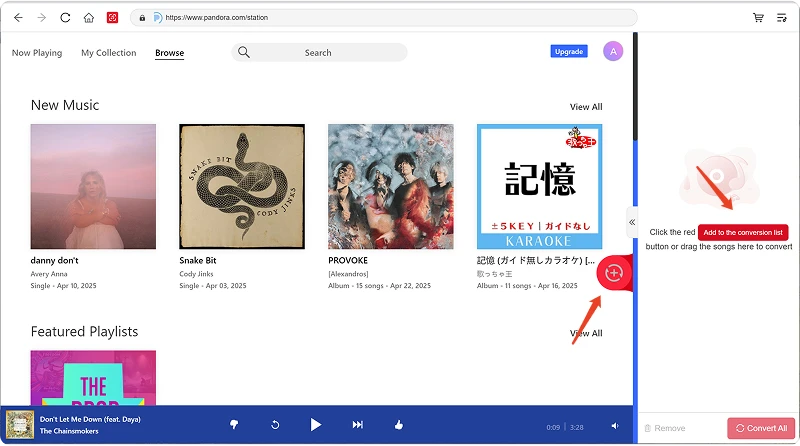
После входа в систему просмотрите свою музыкальную библиотеку и выберите нужные песни, плейлисты, альбомы или подкасты. Нажмите «Добавить для конвертации» рядом с треком или плейлистом, чтобы добавить его в список конвертации, или перетащите музыку на плавающий значок «+».
Доступность контента: Доступность любой песни или альбома полностью зависит от статуса подписки и региональных настроек используемой вами учетной записи.
Шаг 4. Выберите формат вывода и настройте параметры вывода.
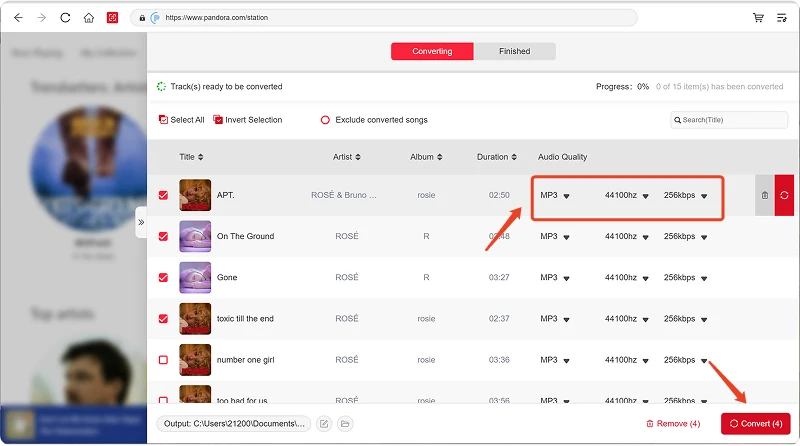
После добавления музыки откройте меню «Формат вывода», чтобы выбрать предпочтительный формат. AMusicSoft Pandora Music Converter также позволяет настраивать доступные параметры вывода в соответствии с вашими потребностями, такие как битрейт, частота дискретизации и другие. Наконец, нажмите на опцию выбора пути или папки для сохранения файлов. Если вы не знакомы с этими настройками, вы можете оставить конфигурацию по умолчанию для более простого процесса конвертации.
Шаг 5. Начните конвертировать музыку.
После настройки всех параметров просмотрите список конвертируемых файлов и нажмите кнопку «Конвертировать». Программа начнет обработку выбранных музыкальных файлов. Информация о ходе выполнения позволит вам отслеживать статус конвертации. Для пакетной конвертации вы можете добавить несколько песен и обрабатывать их вместе, вместо того чтобы конвертировать каждый файл по отдельности.
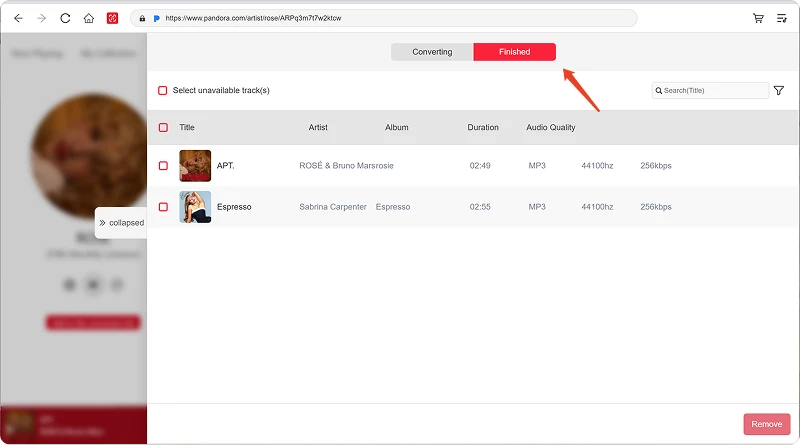
Шаг 6. Найдите преобразованную музыку.
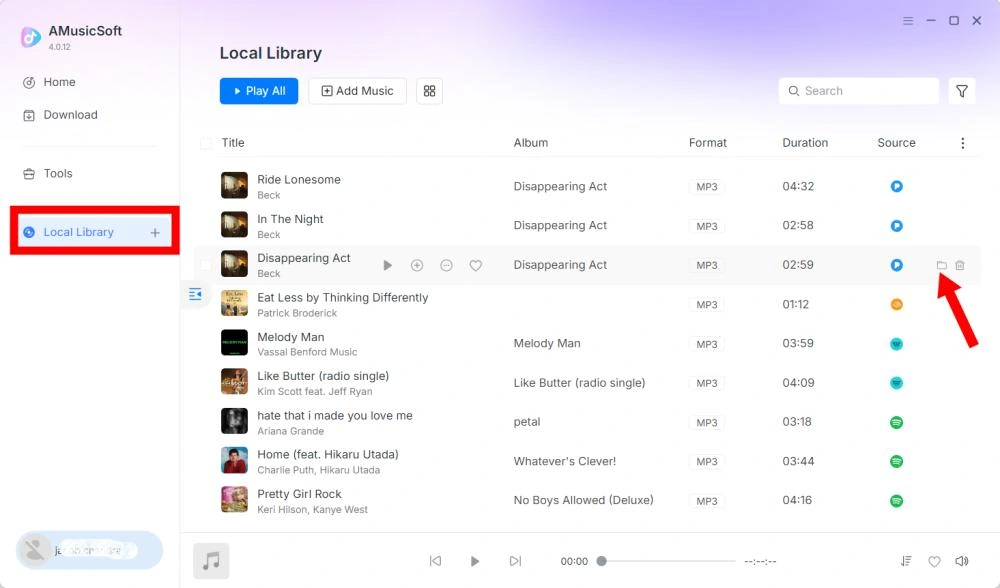
После завершения преобразования откройте выбранную папку с выходными файлами, чтобы получить к ним доступ. Затем вы можете перенести файлы на совместимые устройства, организовать их в локальной музыкальной библиотеке или воспроизвести с помощью поддерживаемых медиаплееров.
Часть 3. Что делать, если я не могу скачать музыку?
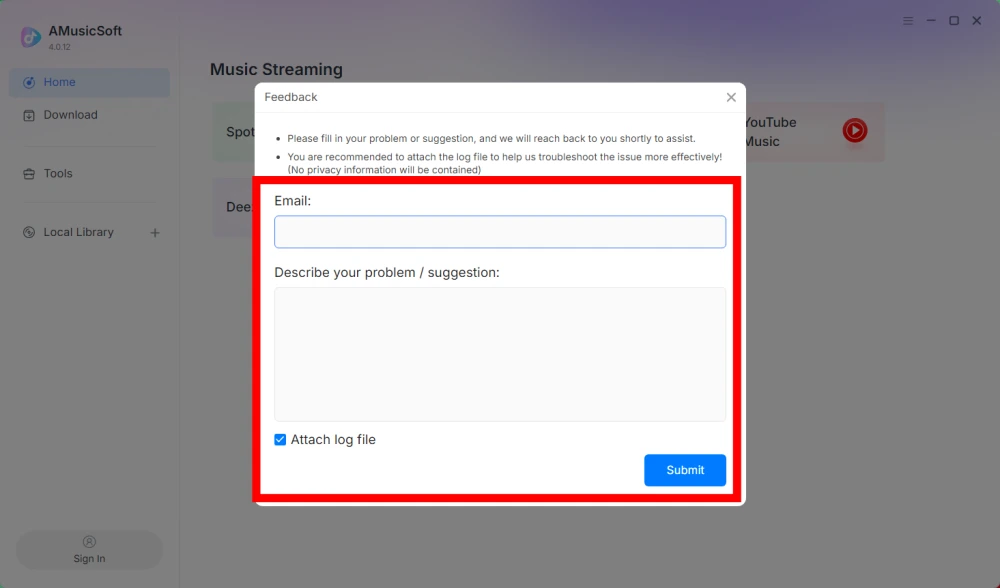
Если у вас возникли проблемы при загрузке или конвертации музыки, пожалуйста, отправьте в нашу службу поддержки лог программы и снимок экрана с ошибкой. Эта информация поможет нам быстрее выявить проблему и предложить решение.
- Щелкните меню в правом верхнем углу программы и выберите «Отправить отзыв».
- Опишите свою проблему и запишите лицензионный ключ в текстовое поле.
- Наконец, перед отправкой, пожалуйста, поставьте галочку в поле «Прикрепить файл журнала».
Часть 4. Как предварительно задать настройки вывода и параметры звука
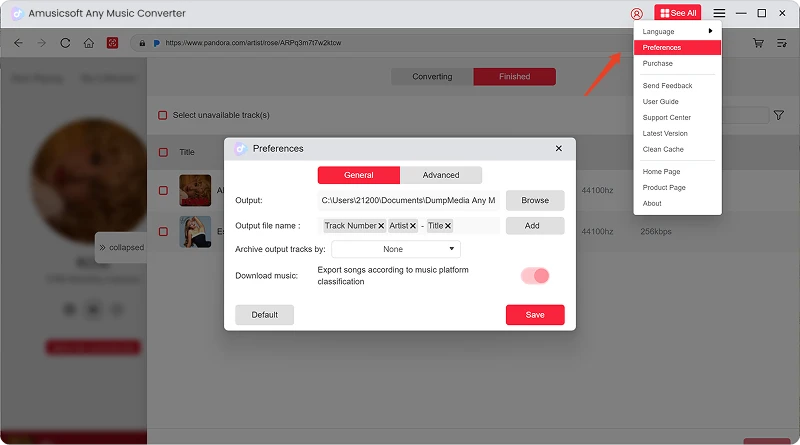
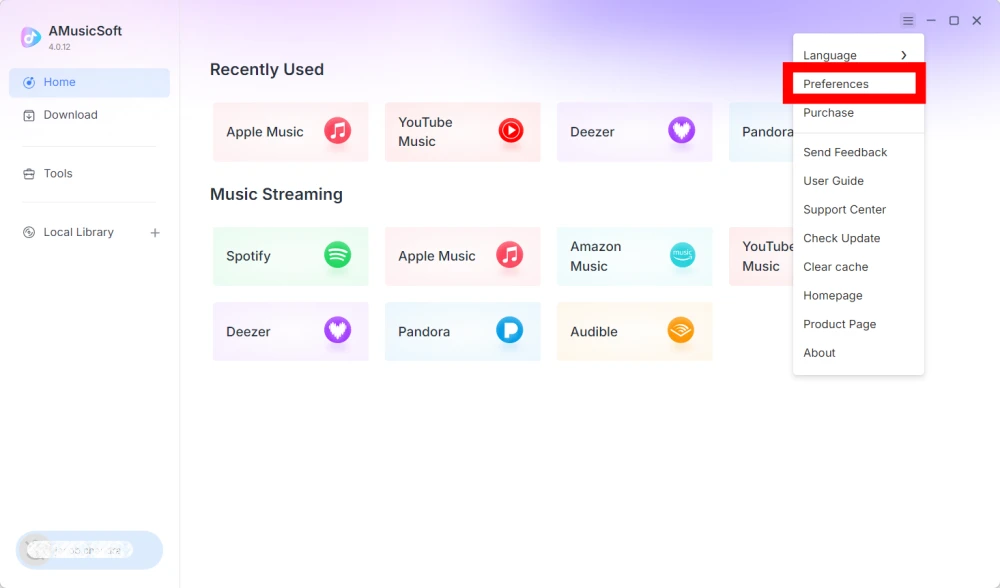
AMusicSoft Any Music Converter позволяет настраивать параметры загрузки и аудиопараметры для управления процессом конвертации и качеством выходного файла. Вы можете изменить эти параметры непосредственно из списка конвертируемых файлов перед началом конвертации или перейти в Меню > Настройки, чтобы заранее задать желаемые параметры.
Язык
Выберите предпочитаемый язык интерфейса программы.
общие настройки
- Внешний вид — Настройка внешнего вида интерфейса программного обеспечения.
- Папка для сохранения — выберите папку для сохранения преобразованных файлов.
- Шаблон автоматического именования — настройте формат именования файлов.
- Архивировать по — выберите способ организации загруженной музыки.
- После завершения конвертации — выберите, что произойдет после завершения конвертации.
- Сохранение музыки — включить или отключить сохранение преобразованных музыкальных файлов.
- Текст песни — Включить или отключить сохранение текста песни вместе с музыкой.
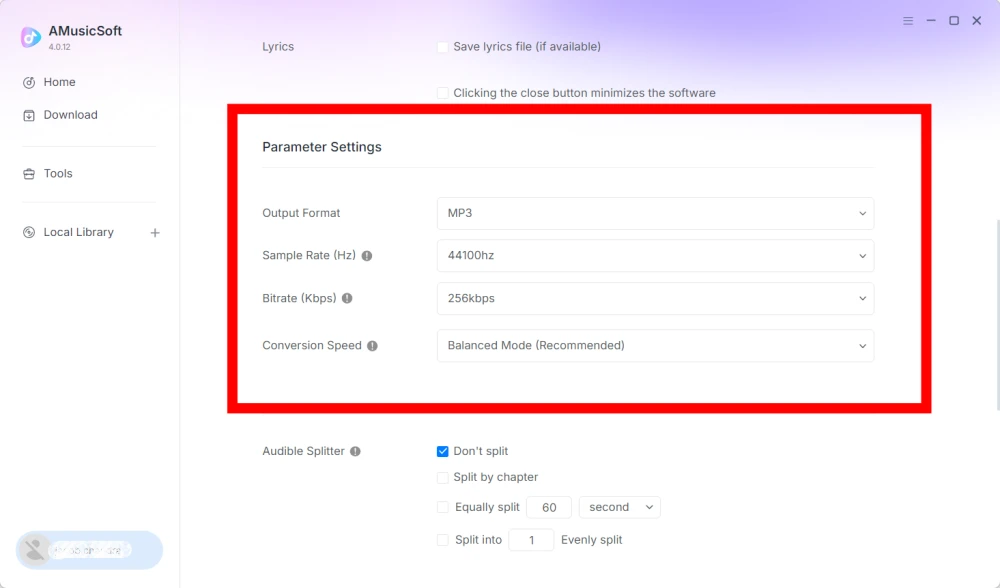
Настройки параметров
- Формат вывода — выберите желаемый формат вывода звука.
- Частота дискретизации (Гц) — установите частоту дискретизации звука. (Диапазон от 22050 Гц до 48000 Гц.)
- Битрейт (кбит/с) — установите битрейт аудиосигнала для управления качеством вывода. (Диапазон от 128 кбит/с до 320 кбит/с.)
- Скорость конвертации — настройте скорость конвертации в соответствии с вашими потребностями.
- Audible Splitter — разделяет аудиокниги Audible на более мелкие части.
Настройки воспроизведения
Функция плавного перехода между песнями — обеспечивает плавный переход между композициями во время воспроизведения.
Параметры сети
- Одновременная загрузка — укажите количество музыкальных файлов, которые будут загружаться одновременно.
- Прокси — настройка параметров прокси для сетевых подключений.
Другие настройки
Всплывающие окна — включение или отключение всплывающих уведомлений.
Часть 5. Как управлять своей учетной записью MusicSoft
Вы можете управлять своей учетной записью AMusicSoft и информацией о подписке в центре управления учетной записью.
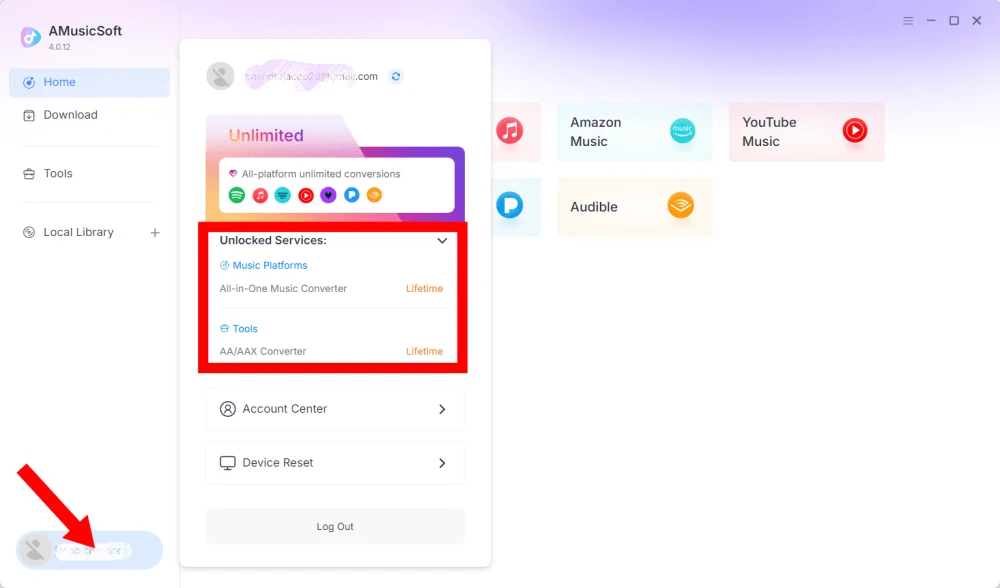
Просмотреть разблокированные услуги
Нажмите на значок профиля в левом нижнем углу. Затем вы сможете проверить, какие услуги и функции в данный момент разблокированы для вашей учетной записи.
Доступ к Центру учётных записей
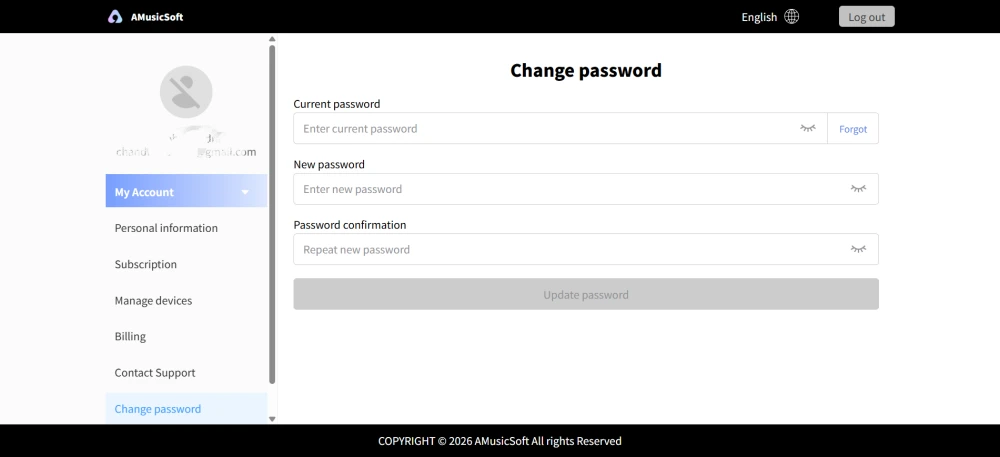
Нажмите на значок профиля > "Центр учетной записи", чтобы перейти в Центр учетной записи AMusicSoft, где вы можете управлять своей учетной записью и связанной с ней информацией.
- Личная информация — обновите свое имя пользователя и нажмите «редактировать», чтобы изменить фотографию аватара. (Осторожно используйте кнопку «Удалить учетную запись» в правом нижнем углу. После удаления учетной записи она и связанный с ней лицензионный ключ будут немедленно деактивированы. Перед продолжением убедитесь, что у вас нет активной подписки.)
- Подписка — просмотр и управление текущими подписками. Если вы хотите отменить подписку, просто нажмите «Управление подпиской», чтобы приостановить ее. Если отменить подписку не удается, обратитесь в службу поддержки клиентов.[электронная почта защищена]).
- Управление устройствами — Если вы переходите на другое устройство и хотите использовать AMusicSoft на новом устройстве, вы можете легко выполнить эту задачу. Если сброс настроек не удается, обратитесь в службу поддержки клиентов.
- Оплата — все детали заказа можно найти здесь. Если вы не можете проверить счет, пожалуйста, свяжитесь со службой поддержки клиентов.
- Изменить пароль — установите новый пароль по своему усмотрению. Если вы забыли свой текущий пароль, нажмите «Забыли». Следуйте инструкциям на экране, чтобы сбросить пароль.
Часть 6. FAQ
-
Подписки AMusicSoft не включают подписки на потоковые сервисы. Для доступа к музыкальным трекам и их конвертации пользователям необходимо сначала иметь собственные учетные записи в потоковых сервисах. Доступность любой песни, плейлиста или альбома полностью зависит от статуса подписки и региональных разрешений используемой вами учетной записи потокового сервиса.
Сервисы потокового вещания по подписке (например, Apple Music): Для доступа к контенту с платных потоковых платформ и его конвертации необходимо иметь активную подписку, привязанную к вашей учетной записи.
Бесплатные сервисы: Для потоковых сервисов, предлагающих бесплатный доступ (например, Spotify), вы можете использовать бесплатную учетную запись для доступа и конвертации доступных музыкальных треков. -
Да. Вы можете предварительно установить формат вывода, частоту дискретизации, битрейт и другие параметры звука в меню > Настройки.
-
По умолчанию преобразованные файлы сохраняются в указанной выходной папке. Вы можете изменить местоположение в разделе «Общие настройки» > «Выходная папка».
-
Да. Перейдите в «Сетевые настройки» > «Одновременные загрузки», чтобы изменить количество одновременных загрузок.